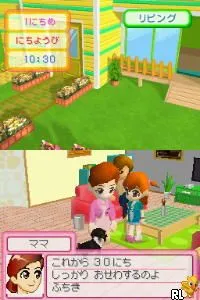
The game loads when you press Play · press “Play Now” inside the game if it asks.
Kawaii Koinu DS 2 (Japan)
Kawaii Koinu DS 2
Kawaii Koinu DS 2 on NDS
- Nintendo DS
- Simulation
- 5· 0 votes
Kawaii Koinu DS 2 is a Japanese title for the Nintendo DS, released as a sequel to the original Kawaii Koinu game. This game falls into the simulation genre, focusing on pet care and nurturing gameplay mechanics. While specific details about its developer and publisher are not widely documented, it reflects the charming aesthetics and gameplay style typical of many DS titles from that era.
In Kawaii Koinu DS 2, players engage in caring for a virtual puppy, interacting with it through various activities. The gameplay revolves around feeding, playing, and training your pet, allowing players to build a bond with their virtual companion. The mechanics are intuitive, often requiring players to respond to their pet's needs and manage its happiness, echoing the life simulation games that were popular on the platform.
This title is worth exploring for fans of pet simulation games or those looking for a slice of life experience on the Nintendo DS. While it may not have the same level of recognition as major titles, it captures the essence of nurturing gameplay that many players enjoy. If you appreciate games that focus on care and companionship, Kawaii Koinu DS 2 offers a simple yet engaging experience that fits well within the DS library.
GAME INFO
- Platform
- Nintendo DS
- Genre
- Simulation
- Region
- Japan
More Kawaii Koinu DS Games
Ready for another round? Explore more Kawaii Koinu DS games and console editions. Choose a game below to play it on its own page.
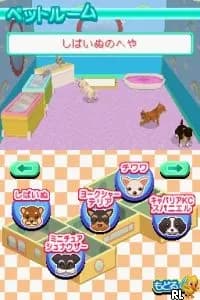
How to play Kawaii Koinu DS 2 online
Getting Started: To begin playing Kawaii Koinu DS 2, start by selecting your puppy from the main menu. You'll find yourself in a vibrant world where your primary goal is to care for your pet. Pay attention to its needs and engage in various activities to keep it happy and healthy.
As you progress, you'll unlock new interactions and items that can enhance your gameplay experience. Managing your pet's happiness and well-being is key, so regularly check its status to ensure you are meeting its needs. Since this title is only available in Japanese, familiarize yourself with basic menu navigation to effectively access different features and options.
CONTROLS
Controls
- Arrow Keys — D-Pad / Movement
- X — A button
- S — B button
- Z — Y button
- A — X button
- Q — L shoulder
- E — R shoulder
- Enter — Start
- V — Select
Kawaii Koinu DS 2 FAQ
Can players save progress in Kawaii Koinu DS 2?
Save progress is not widely documented, so it's unclear if there is a save feature in Kawaii Koinu DS 2.
Is Kawaii Koinu DS 2 an official release, a fan hack, a prototype, or another kind of build?
This title is an official release in Japan, not a fan hack or prototype.
In what year was Kawaii Koinu DS 2 originally released?
The original release year is not widely documented, and specific details about the release date are scarce.
You may also like
All Nintendo DS games











GAME INFO
- Platform
- Nintendo DS
- Genre
- Simulation
- Region
- Japan
COMMENTS (0)
No comments yet. Be the first to share your thoughts.