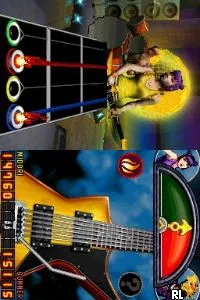
Guitar Hero - On Tour - Decades (Europe) (Fr,De,Es,It)
Guitar Hero - On Tour - Decades (Europe) (Fr,De,Es,It): NDS Music
Guitar Hero - On Tour - Decades (Europe) (Fr,De,Es,It) is a music rhythm game released for the Nintendo DS. It launched in Europe as part of the Guitar Hero franchise, which is well-known for bringing the experience of playing rock music to life through gaming. This title was developed by Vicarious Visions and published by Activision, continuing the series' tradition of engaging gameplay and a wide array of music tracks.
In this game, players use a guitar grip accessory to hit notes in time with the music, simulating the experience of playing guitar in a band. The gameplay revolves around a series of songs, where players will match colored notes that scroll down the screen by pressing the corresponding buttons on the grip. The game includes a variety of modes, allowing players to practice songs, compete against friends, or simply enjoy the music, making it accessible for both seasoned players and newcomers alike.
This title is definitely worth a try for fans of rhythm games and the Guitar Hero series. While it may not have the depth of the console versions, it offers a fun and portable way to enjoy music and rhythm gameplay. The tracklist features a mix of classic and modern rock songs, providing a nostalgic experience for older players while still appealing to newer fans of the genre. Overall, it fits nicely into the library of DS games, especially for those who appreciate music-themed titles.
How to Play Guitar Hero - On Tour - Decades (Europe) (Fr,De,Es,It) Online
Getting started with Guitar Hero - On Tour - Decades is straightforward. After launching the game, you can navigate through the menus to select a song or mode. The core gameplay loop involves hitting the notes that appear on the screen in time with the music, which requires quick reflexes and a good sense of timing.
Guitar Hero - On Tour - Decades (Europe) (Fr,De,Es,It) Keyboard Controls
Controls
- Arrow Keys — D-Pad / Movement
- X — A button
- S — B button
- Z — Y button
- A — X button
- Q — L shoulder
- E — R shoulder
- Enter — Start
- V — Select
Comments (0)