Vigilante 8 (France)
What is Vigilante 8 (France)?
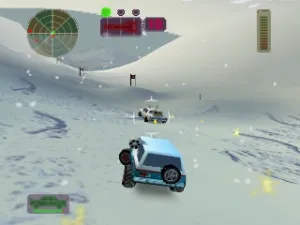
Vigilante 8 (France) is a vehicular combat game released for the Nintendo 64. Developed by Luxoflux and published by Activision, it made its debut in 1998. The game is part of the action genre, allowing players to engage in intense car battles, which was a popular concept during the late 1990s, especially with the rise of 3D gaming on consoles like the N64.
In Vigilante 8, players select from a variety of unique vehicles, each equipped with their own weapons and abilities. The gameplay revolves around battling against opponents in various arenas, utilizing power-ups and environmental hazards to gain the upper hand. Players can engage in single-player modes or compete against friends, making use of strategic maneuvers and weaponry to defeat rivals in fast-paced matches.
This title deserves attention for its nostalgic value and its contribution to the vehicular combat genre alongside contemporaries like Twisted Metal. While it may not be as widely recognized as some other franchises, its quirky characters and engaging gameplay mechanics offer a unique experience for fans of retro gaming. Those who appreciate classic multiplayer experiences will find Vigilante 8 a fun addition to their collection, especially for fans of arcade-style action games.
How to Play Vigilante 8 (France) Online
To get started with Vigilante 8, select your vehicle and arena from the main menu. The game offers a variety of modes, including single-player missions and multiplayer battles. Familiarize yourself with the controls to maneuver your vehicle effectively and utilize your weapons against opponents.
The core loop involves engaging in combat with other vehicles, using both offensive and defensive strategies. Collect power-ups that appear in the arena to enhance your capabilities and keep an eye on your health. Learning how to manage your resources and using the environment to your advantage will be crucial to mastering the game.
Vigilante 8 (France) Keyboard Controls
Controls
- Arrow Keys — D-Pad / Movement
- X — A button
- S — B button
- Z — Z trigger
- A — C-Down
- Q — L shoulder
- E — R shoulder
- Enter — Start





Comments (0)