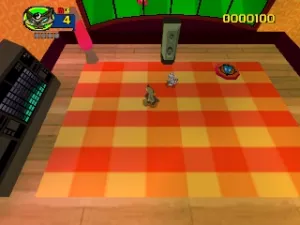
Rat Attack! (Europe) (En,Fr,De,Es,It,Nl)
About Rat Attack! (Europe) (En,Fr,De,Es,It,Nl)
Rat Attack! is a unique action game released for the Nintendo 64, notable for its quirky premise and gameplay. Originating in Europe, this title is primarily recognized for its fun, engaging mechanics that revolve around controlling a rat character in various environments. While not developed by a major studio like Nintendo or Rare, the game still offers a distinct experience within the N64 library.
In Rat Attack!, players navigate through levels filled with obstacles and enemies, utilizing action-based mechanics to overcome challenges. The core gameplay involves strategic movement and timing as players attack and evade foes while completing objectives. The game typically features colorful graphics and playful animations, which contribute to its lighthearted tone.
Today, Rat Attack! holds a niche place in retro gaming history. While it may not be as widely recognized as other titles on the Nintendo 64, it offers a charming experience that can appeal to fans of the action genre. It stands as a testament to the diverse range of games available on the platform, providing an alternative to more mainstream titles and showcasing the creativity of its era.
How to Play Rat Attack! (Europe) (En,Fr,De,Es,It,Nl) Online
Getting started in Rat Attack! involves selecting your game mode and familiarizing yourself with the controls. Once in the game, you will navigate through various levels filled with obstacles and enemies. Your primary goal is to maneuver your character effectively, using your attacks to clear paths and defeat foes.
The core loop revolves around exploring each level, completing objectives, and engaging in combat. Pay attention to the layout of each stage, as understanding enemy patterns can greatly enhance your gameplay. Mastering the controls and timing your attacks will be key to progressing through the game and enjoying its quirky charm.
Rat Attack! (Europe) (En,Fr,De,Es,It,Nl) Keyboard Controls
Controls
- Arrow Keys — D-Pad / Movement
- X — A button
- S — B button
- Z — Z trigger
- A — C-Down
- Q — L shoulder
- E — R shoulder
- Enter — Start





Comments (0)