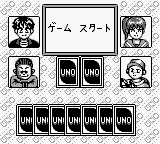
The game loads when you press Play · press “Play Now” inside the game if it asks.
Uno - Small World (Japan)
Uno - Small World
Getting to Know Uno - Small World
- Game Boy
- Board Game
- 5· 0 votes
GAME INFO
- Platform
- Game Boy
- Genre
- Board Game
- Players
- 1
- Region
- Japan
How to play Uno - Small World online
To get started with Uno - Small World, begin by selecting a game mode from the main menu, which is presented in Japanese. Familiarize yourself with the rules of Uno if you haven't played before, as this will help you understand the gameplay mechanics. Once you select your game mode, you will join other players in a turn-based format.
The core loop involves drawing cards, playing them strategically, and attempting to be the first to empty your hand. Pay attention to the special action cards, as they can significantly change the flow of the game. If you're new to the game, take your time navigating the menus and remember to call out "Uno!" when you're down to one card.
CONTROLS
Controls
- Arrow Keys — D-Pad / Movement
- X — A button (jump / confirm)
- S — B button (run / attack / cancel)
- Enter — Start / Pause
- V — Select
Uno - Small World FAQ
Who developed Uno - Small World?
The developer of Uno - Small World is not widely documented.
Is there anything iconic or memorable about Uno - Small World?
The game is notable for adapting the classic Uno gameplay to the Game Boy format, making it a portable option for fans of the card game.
Does Uno - Small World have a multiplayer or co-op mode?
Uno - Small World primarily focuses on a single-player experience, though it retains the competitive nature of the original card game.
You may also like
All Game Boy games
GAME INFO
- Platform
- Game Boy
- Genre
- Board Game
- Players
- 1
- Region
- Japan
COMMENTS (0)
No comments yet. Be the first to share your thoughts.