CHOOSE A VERSION
2 versions · same consoleChoose an original release, regional version, revision, bootleg or clearly labelled ROM hack/mod, then press Play. Hacks may change the gameplay. Switching versions restarts the player.
Selected: Default · USA, Europe · USA, Europe
The game loads when you press Play · press “Play Now” inside the game if it asks.
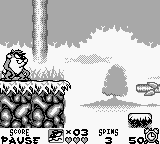
Taz-Mania (USA, Europe)
Taz-Mania
Taz-Mania - Platformer Classic
- Game Boy
- Platformer
- 5· 0 votes
GAME INFO
- Platform
- Game Boy
- Genre
- Platformer
- Developer
- NuFX
- Released
- 1992
- Players
- 1
- Region
- USA, Europe
How to play Taz-Mania online
CONTROLS
Controls
- Arrow Keys — D-Pad / Movement
- X — A button (jump / confirm)
- S — B button (run / attack / cancel)
- Enter — Start / Pause
- V — Select
Taz-Mania FAQ
What type of game is Taz-Mania?
This game is a platformer featuring the iconic Looney Tunes character Taz. Players navigate various levels filled with enemies and obstacles, utilizing Taz's unique abilities to progress.
Can players save progress in Taz-Mania?
Taz-Mania does not have a save feature, which is common for many Game Boy titles from this era. Players need to complete levels in one sitting to advance through the game.
Is there anything iconic or memorable about Taz-Mania?
The game captures the essence of the Looney Tunes franchise, allowing fans to control Taz in a fun, interactive way. Its colorful graphics and simple gameplay mechanics are reminiscent of the early 90s platforming experience.
You may also like
All Game Boy games











GAME INFO
- Platform
- Game Boy
- Genre
- Platformer
- Developer
- NuFX
- Released
- 1992
- Players
- 1
- Region
- USA, Europe
COMMENTS (0)
No comments yet. Be the first to share your thoughts.