CHOOSE A VERSION
3 versions · same consoleChoose an original release, regional version, revision, bootleg or clearly labelled ROM hack/mod, then press Play. Hacks may change the gameplay. Switching versions restarts the player.
Selected: Default · USA · USA
The game loads when you press Play · press “Play Now” inside the game if it asks.
Super Hunchback (USA)
Super Hunchback
About Super Hunchback
- Game Boy
- Platformer
- 5· 0 votes
GAME INFO
- Platform
- Game Boy
- Genre
- Platformer
- Publisher
- Ocean Software
- Developer
- Ocean Software
- Released
- 1992
- Players
- 1
- Region
- USA
How to play Super Hunchback online
CONTROLS
Controls
- Arrow Keys — D-Pad / Movement
- X — A button (jump / confirm)
- S — B button (run / attack / cancel)
- Enter — Start / Pause
- V — Select
Super Hunchback FAQ
What makes Super Hunchback stand out among Game Boy titles of its era?
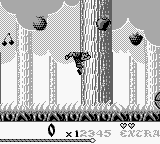
The game features classic platforming mechanics that were popular during the Game Boy's heyday, but it doesn't have the same level of recognition as other titles. Its unique charm lies in its simplicity and nostalgic appeal for fans of retro gaming.
Is Super Hunchback considered easy to pick up or challenging?
While the controls are straightforward, the game's difficulty can ramp up as levels progress, requiring players to refine their skills. New players might find it easy to start, but mastering the game can present a challenge.
Does Super Hunchback have a multiplayer or co-op mode?
There is no multiplayer or co-op mode in Super Hunchback. The game is designed for a single-player experience, focusing on individual skill development and level completion.
You may also like
All Game Boy games











GAME INFO
- Platform
- Game Boy
- Genre
- Platformer
- Publisher
- Ocean Software
- Developer
- Ocean Software
- Released
- 1992
- Players
- 1
- Region
- USA
COMMENTS (0)
No comments yet. Be the first to share your thoughts.