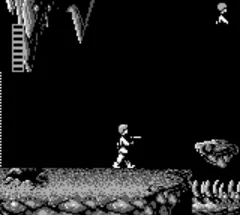
The game loads when you press Play · press “Play Now” inside the game if it asks.
Star Wars (USA, Europe) (Rev A)
Star Wars
What is Star Wars?
Star Wars (USA, Europe) (Rev A) is a revision of the classic action game released for the Game Boy. It is based on the iconic Star Wars franchise, which has seen numerous adaptations across various platforms. The game is notable for being a revision, allowing for some refinements over its predecessor, though details on specific changes are not widely documented.
In this game, players take on the role of a character navigating through various levels inspired by the Star Wars universe. The gameplay involves platforming elements and combat mechanics, where players must defeat enemies and overcome obstacles to progress. Each level may include different challenges that require quick reflexes and strategic thinking, typical of action games of this era.
Despite its age, Star Wars (Rev A) still holds a place in the hearts of retro gaming enthusiasts. While it may not be as groundbreaking as some of its contemporaries, it offers a nostalgic experience for fans of the franchise and the platforming genre. The game serves as a reminder of the era's charm and simplicity, making it worth a try for those interested in classic gaming or the Star Wars legacy.
GAME INFO
How to play Star Wars online
Getting started in Star Wars (Rev A) involves selecting your character and familiarizing yourself with the controls. Once in the game, you'll navigate through various levels, facing enemies and obstacles along the way. The core loop revolves around defeating foes and reaching the end of each level, with each stage presenting unique challenges.
As you play, pay attention to the layout of each level and the types of enemies you encounter. Learning their patterns will help you strategize your attacks. Collecting power-ups or items may also be crucial for enhancing your abilities, so keep an eye out for those as you progress through the game.
CONTROLS
Controls
- Arrow Keys — D-Pad / Movement
- X — A button (jump / confirm)
- S — B button (run / attack / cancel)
- Enter — Start / Pause
- V — Select
Star Wars FAQ
Is Star Wars exclusive to Game Boy or did it appear on other systems?
The game was released on the Game Boy and is not widely documented as being available on other systems.
Can players save progress in Star Wars?
The game does not feature a save system, so players will need to complete it in one sitting or use passwords if available.
Who developed Star Wars?
The information about the developer is not widely documented, but it is generally associated with adaptations of the Star Wars franchise.












COMMENTS (0)
No comments yet. Be the first to share your thoughts.