The game loads when you press Play · press “Play Now” inside the game if it asks.
Soldam (Japan)
Soldam
Getting to Know Soldam
Soldam for Game Boy is a puzzle game released exclusively in Japan. It was developed by the company known for its innovative titles, but specific details about the developer are not widely documented. The game fits within the puzzle genre, which was very popular during the handheld gaming era of the early 90s, a time when developers were experimenting with unique concepts and gameplay mechanics on portable devices.
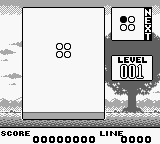
In Soldam, players engage with a grid-based puzzle system where the main objective is to arrange falling blocks to create specific patterns. The gameplay revolves around strategic placement and quick thinking, with the player needing to anticipate the next blocks that will appear. As the game progresses, it introduces more complex patterns and faster block drops, challenging the player’s puzzle-solving skills and reflexes.
Today, Soldam is worth trying for fans of retro puzzle games due to its unique mechanics and the nostalgic charm of Game Boy titles. It may not be as widely recognized as other puzzle games from the era, but it offers a refreshing take on the genre. While it appeals to a niche audience, its simplicity and engaging gameplay can still provide a fun experience for those looking to explore lesser-known gems from the Game Boy library.
GAME INFO
How to play Soldam online
To get started in Soldam, first, familiarize yourself with the controls as outlined above. Once you start the game, you'll find yourself on a grid where blocks will begin to fall from the top. Your goal is to arrange these blocks to form the required patterns before they reach the bottom of the screen.
As you play, focus on creating combinations and clearing blocks efficiently. The game requires quick thinking and strategic placement, especially as the speed increases. Keep an eye on the next blocks coming down so you can plan your moves ahead of time. Note that the menus are in Japanese, so some navigation might require trial and error or familiarity with basic Japanese terms.
CONTROLS
Controls
- Arrow Keys — D-Pad / Movement
- X — A button (jump / confirm)
- S — B button (run / attack / cancel)
- Enter — Start / Pause
- V — Select
Soldam FAQ
Who developed Soldam?
The developer of Soldam is not widely documented, leaving some ambiguity about its origins.
Is Soldam exclusive to Game Boy or did it appear on other systems?
Soldam was released exclusively for the Game Boy and did not appear on other systems.
Does Soldam have a multiplayer or co-op mode?
Soldam does not have a multiplayer or co-op mode; it is a single-player experience focused on puzzle-solving.












COMMENTS (0)
No comments yet. Be the first to share your thoughts.