CHOOSE A VERSION
2 versions · same consoleChoose an original release, regional version, revision, bootleg or clearly labelled ROM hack/mod, then press Play. Hacks may change the gameplay. Switching versions restarts the player.
Selected: Default · USA · USA
The game loads when you press Play · press “Play Now” inside the game if it asks.
Serpent (USA)
Serpent
Serpent: GB Action
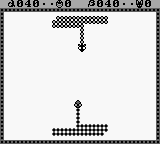
Serpent (USA) is an action game released for the Game Boy. This title, which came out during the early 1990s, is known for its simple yet engaging gameplay mechanics typical of the era. The game was not developed by a major studio, and details surrounding its release are not widely documented, making it less known compared to other Game Boy titles.
In Serpent, players navigate a snake-like character through various levels, collecting items and avoiding obstacles. The gameplay revolves around maneuvering the serpent to grow in length while trying to avoid collisions with the environment or its own tail. Players must think strategically about their movements to progress through the increasingly challenging stages, which is a common theme in many action games from this period.
This title is worth exploring for those who appreciate the retro gaming scene and want to experience the simplicity of early handheld games. While it may not have the depth or polish of some blockbuster titles, it offers a nostalgic glimpse into the action genre of the Game Boy era. For fans of the genre, it serves as a reminder of the creativity that could thrive within the limitations of early portable gaming devices.
GAME INFO
- Platform
- Game Boy
- Genre
- Action
- Publisher
- Taxan
- Developer
- Kaga Create
- Released
- 1990
- Players
- 1
- Region
- USA
How to play Serpent online
To get started in Serpent, begin by familiarizing yourself with the controls. Use the D-Pad to navigate your serpent character around the screen. The main objective is to collect various items while avoiding obstacles and your own tail, which adds a layer of strategic thinking to your movements.
As you progress, the levels will become more challenging, requiring quick reflexes and careful planning. Pay attention to the layout of each level and try to anticipate where obstacles will appear. The core loop involves collecting items to grow your serpent while avoiding collisions, making each session a test of skill and patience.
CONTROLS
Controls
- Arrow Keys — D-Pad / Movement
- X — A button (jump / confirm)
- S — B button (run / attack / cancel)
- Enter — Start / Pause
- V — Select
Serpent FAQ
Is Serpent an official release, a fan hack, a prototype, or another kind of build?
This game is an official release for the Game Boy, though it is less well-known than many other titles from that era.
Does Serpent have a multiplayer or co-op mode?
There is no multiplayer or co-op mode in Serpent; it is designed for single-player gameplay only.
Who developed Serpent?
The developer of Serpent is not widely documented, and specific details about its creation are scarce.
You may also like
All Game Boy games











GAME INFO
- Platform
- Game Boy
- Genre
- Action
- Publisher
- Taxan
- Developer
- Kaga Create
- Released
- 1990
- Players
- 1
- Region
- USA
COMMENTS (0)
No comments yet. Be the first to share your thoughts.