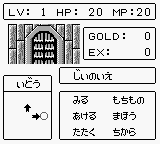
The game loads when you press Play · press “Play Now” inside the game if it asks.
Selection I & II (Japan)
Selection I & II
What is Selection I & II?
Selection I & II (Japan) is a compilation title released for the Game Boy. This game was designed to showcase various mini-games, typical of the early 90s gaming era, where collections of smaller experiences were popular. While specific development details are sparse, it reflects the trend of creating engaging and accessible content for handheld devices during this time.
In Selection I & II, players navigate through a series of mini-games that challenge their reflexes, timing, and puzzle-solving skills. The gameplay is structured around quick sessions, allowing players to jump in and out of different challenges. Each game varies in mechanics, providing a diverse experience that keeps things fresh, though the lack of a cohesive narrative might not appeal to all players.
This title is worth exploring, particularly for fans of retro compilations. It embodies the spirit of the Game Boy's library, offering a nostalgic trip for those who appreciate the simplicity of early handheld gaming. While it may not compete with larger, more expansive titles of its era, its charm lies in its straightforward approach and the variety it provides in short play sessions.
GAME INFO
How to play Selection I & II online
Getting started with Selection I & II involves familiarizing yourself with the mini-games available in the compilation. As you select a game from the main menu, you will be prompted to learn the rules specific to that challenge. Since this title is primarily in Japanese, navigating the menus requires some patience, but the gameplay mechanics are generally intuitive.
Once you dive into a mini-game, the core loop typically revolves around completing the task at hand within a set time limit or achieving a specific score. These mini-games can range from simple reflex tests to puzzles requiring quick thinking. The variety ensures that you won’t get bored quickly, and each game can be played multiple times to improve your score or technique.
CONTROLS
Controls
- Arrow Keys — D-Pad / Movement
- X — A button (jump / confirm)
- S — B button (run / attack / cancel)
- Enter — Start / Pause
- V — Select
Selection I & II FAQ
Which regions was Selection I & II released in?
This title was exclusively released in Japan, catering to the local gaming audience of the time.
Is Selection I & II exclusive to Game Boy or did it appear on other systems?
Selection I & II was designed specifically for the Game Boy and did not appear on other systems, maintaining its legacy on this handheld platform.
Is Selection I & II an official release, a fan hack, a prototype, or another kind of build?
This game is an official release for the Game Boy, intended to provide a collection of mini-games for players to enjoy.












COMMENTS (0)
No comments yet. Be the first to share your thoughts.