The game loads when you press Play · press “Play Now” inside the game if it asks.
Roger Clemens MVP Baseball (Japan)
Roger Clemens MVP Baseball
Roger Clemens MVP Baseball on GB
GAME INFO
How to play Roger Clemens MVP Baseball online
Getting started: Fire up the ROM and you'll see a title screen in Japanese. Press Start to advance past it, then use the D-Pad to navigate the menus. Options are typically written in kanji and kana, but you can usually spot the "start game" option by its placement or by trying each choice. Expect modes like single exhibition, season, or all-star game, though labels are in Japanese.
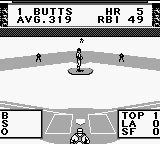
The core loop is simple: you pitch and bat. On defense, you select a pitch type with the B button and aim with the D-Pad before throwing. Timing and placement matter to fool the batter. When batting, press A to swing, timing your swing to the ball's arrival. Fielding is automatic or very simple - the game handles most of it, so you focus on pitching and hitting. Runs are scored by hitting the ball into gaps and advancing runners.
Because this is a Japanese import, the menus remain untranslated. If you can't read the language, trial and error is the quickest way to learn. Save features are absent in the original cart - it's a perpetual season unless you start a new game. The game offers a decent challenge for a portable baseball sim from the era, with pitcher stamina and batter stats affecting outcomes.
CONTROLS
Controls
- Arrow Keys: D-Pad / Movement
- X: A button (jump / confirm)
- S: B button (run / attack / cancel)
- Enter: Start / Pause
- V: Select
Roger Clemens MVP Baseball FAQ
Is Roger Clemens MVP Baseball considered easy to pick up or challenging?
It lands on the easier side for a baseball sim, with straightforward controls and simple fielding mechanics. The main challenge comes from timing your swings against varied pitches, but it never gets punishingly hard.
Does Roger Clemens MVP Baseball have a multiplayer or co-op mode?
Documentation for multiplayer is sparse; the original Game Boy release likely did not support link cable play. Most account lists single-player only, so co-op or versus modes are not present in this title.
Is there anything iconic or memorable about Roger Clemens MVP Baseball?
Its main draw is the license itself - a sports game starring a famous MLB pitcher on Nintendo's handheld. For collectors, the Japanese packaging and the unique roster of its era give it a nostalgic pull, even if the gameplay is typical of early 90s portable baseball.












COMMENTS (0)
No comments yet. Be the first to share your thoughts.