The game loads when you press Play · press “Play Now” inside the game if it asks.
Red Arremer - Makaimura Gaiden (Japan)
Red Arremer - Makaimura Gaiden
About Red Arremer - Makaimura Gaiden
- Game Boy
- Platformer
- 5· 0 votes
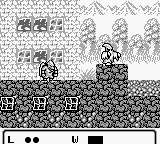
Red Arremer - Makaimura Gaiden is a classic action platformer released exclusively in Japan for the Game Boy. Developed by Capcom, this title is part of the Makaimura series, known internationally as Ghosts 'n Goblins. It launched in 1990 and showcases the era's distinct 8-bit graphics and challenging gameplay mechanics that fans of retro gaming appreciate.
In this game, players control a character navigating through various levels filled with enemies and obstacles. The gameplay emphasizes platforming skills, requiring players to jump, run, and attack while avoiding enemies and projectiles. Collecting power-ups and defeating bosses is key to progressing through the game's stages, which are designed to test reflexes and strategy.
What makes Red Arremer - Makaimura Gaiden worth trying today is its nostalgic charm and the challenge it presents, typical of Capcom's titles during this era. While it may not have the same level of recognition as its console counterparts, it offers a solid platforming experience that can be a fun throwback for those familiar with action games of the late 80s and early 90s. It's a niche title that serves as a reminder of the creativity and challenge that defined early handheld gaming.
GAME INFO
- Platform
- Game Boy
- Genre
- Platformer
- Released
- 1990
- Players
- 1
- Region
- Japan
How to play Red Arremer - Makaimura Gaiden online
Getting Started: To begin, start the game and navigate through the initial menu, which is in Japanese. Familiarize yourself with the controls as you will need to jump and attack right away to overcome early obstacles and enemies.
The core gameplay loop consists of moving through levels, defeating enemies, and collecting power-ups. Pay attention to your surroundings, as some items can enhance your abilities or provide extra lives. Completing levels requires a combination of skillful jumping and strategic attacks, so practice is essential to mastering the game.
CONTROLS
Controls
- Arrow Keys — D-Pad / Movement
- X — A button (jump / confirm)
- S — B button (run / attack / cancel)
- Enter — Start / Pause
- V — Select
Red Arremer - Makaimura Gaiden FAQ
What makes Red Arremer - Makaimura Gaiden stand out among Game Boy titles of its era?
The game features classic platforming mechanics with a focus on challenging gameplay, common in Capcom's titles. It offers a unique visual style and level design that resonates with fans of retro games.
Is Red Arremer - Makaimura Gaiden exclusive to Game Boy or did it appear on other systems?
This title was released exclusively for the Game Boy, making it a unique entry in the Makaimura series. It did not appear on other systems or platforms.
In what year was Red Arremer - Makaimura Gaiden originally released?
The game was originally released in 1990, adding to the rich library of handheld titles from that decade.
You may also like
All Game Boy games











GAME INFO
- Platform
- Game Boy
- Genre
- Platformer
- Released
- 1990
- Players
- 1
- Region
- Japan
COMMENTS (0)
No comments yet. Be the first to share your thoughts.