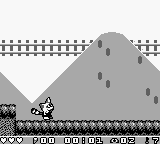
The game loads when you press Play · press “Play Now” inside the game if it asks.
Pokonyan! - Yume no Daibouken (Japan)
Pokonyan! - Yume no Daibouken
About Pokonyan! - Yume no Daibouken
Pokonyan! - Yume no Daibouken is a Japanese title released for the Game Boy, a popular handheld console in the 1990s. This game fits within the action genre, featuring a blend of platforming elements. While the exact developer is not widely documented, the game is notable for its charming graphics and whimsical design, typical of the era's Japanese releases.
In this game, players navigate through various levels, overcoming obstacles and defeating enemies to progress. The gameplay mechanics involve jumping, running, and utilizing various abilities to interact with the environment. Although specific story details are scarce, the core loop revolves around exploration and skillful platforming, which was a hallmark of many Game Boy titles.
Today, Pokonyan! - Yume no Daibouken is an interesting title to explore for fans of retro gaming. While it may not be as widely recognized as other Game Boy classics, it offers a nostalgic experience that reflects the platform's design conventions. It serves as a reminder of the creativity found in lesser-known titles during the handheld's heyday, appealing to collectors and enthusiasts looking for something unique in their library.
GAME INFO
How to play Pokonyan! - Yume no Daibouken online
To get started with Pokonyan! - Yume no Daibouken, first launch the game and familiarize yourself with the controls. The game's menus are in Japanese, so it might take a bit to get accustomed to navigating them. Focus on exploring your surroundings and interacting with objects to learn the mechanics.
As you begin playing, you'll find that the core gameplay loop involves jumping over obstacles and defeating enemies to clear levels. Keep an eye out for power-ups or items that can enhance your abilities. Mastering the timing of your jumps and attacks is crucial for progressing through the game, so practice makes perfect.
CONTROLS
Controls
- Arrow Keys — D-Pad / Movement
- X — A button (jump / confirm)
- S — B button (run / attack / cancel)
- Enter — Start / Pause
- V — Select
Pokonyan! - Yume no Daibouken FAQ
Is Pokonyan! - Yume no Daibouken exclusive to Game Boy or did it appear on other systems?
This game is exclusive to the Game Boy and did not see releases on other systems. Its unique charm and gameplay are tied closely to the handheld experience.
In what year was Pokonyan! - Yume no Daibouken originally released?
The exact release year of Pokonyan! - Yume no Daibouken is not widely documented. Information on this title is limited, making it challenging to pinpoint its original launch date.
Who developed Pokonyan! - Yume no Daibouken?
The developer of Pokonyan! - Yume no Daibouken is not clearly documented. As with its release year, details about the development team remain elusive.












COMMENTS (0)
No comments yet. Be the first to share your thoughts.