The game loads when you press Play · press “Play Now” inside the game if it asks.
Pang (USA)
Pang
Pang Overview
Pang (USA) is an action game originally released for the Game Boy. Developed by Mitchell Corporation, this title hit the shelves during the early 1990s, contributing to the vibrant library of handheld games that defined the era. It is a port of the arcade classic Pang, known for its engaging gameplay and simple yet addictive mechanics, and it remains a nostalgic favorite for many retro gaming enthusiasts.
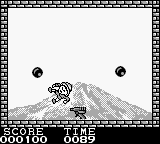
In Pang, players take on the role of a character tasked with popping balloons that descend from the top of the screen. Using a harpoon-like weapon, players must strategically bounce off the balloons to break them into smaller pieces, which can then be popped again. The challenge escalates as players navigate through different levels, avoiding obstacles and enemies that can hinder their progress. The game emphasizes precision and timing, requiring players to plan their movements carefully to clear each stage.
What makes Pang worth trying today is its straightforward yet engaging gameplay that appeals to both casual and seasoned gamers. While it may not boast the depth of some modern titles, its charm lies in its simplicity and the satisfaction of mastering its mechanics. For fans of the genre and those looking to experience a slice of gaming history, Pang offers a fun diversion that captures the essence of arcade gaming on a handheld device.
GAME INFO
How to play Pang online
To get started with Pang, choose a game mode and begin at the first level. Your main objective is to pop all the balloons on the screen using your harpoon. As you progress, be mindful of the smaller balloon pieces that bounce around, as they can still pose a threat. Timing your shots and positioning is key, especially as the levels become more challenging.
As you play, keep an eye out for power-ups that can enhance your abilities or grant you temporary advantages. The core loop involves clearing levels by popping balloons while avoiding enemies that can hinder your progress. Mastering the controls and level layouts will greatly improve your chances of success, so take your time to familiarize yourself with the game mechanics.
CONTROLS
Controls
- Arrow Keys — D-Pad / Movement
- X — A button (jump / confirm)
- S — B button (run / attack / cancel)
- Enter — Start / Pause
- V — Select
Pang FAQ
Who developed Pang?
The development of Pang is attributed to Mitchell Corporation, known for creating the original arcade version of the game.
Roughly how long does it take to finish Pang?
The time it takes to finish Pang can vary greatly depending on player skill, but it typically ranges from 1 to 3 hours to complete all levels.
Can players save progress in Pang?
Pang does not feature a save system. Players must complete the game in one sitting, which adds to the challenge of the arcade-style gameplay.












COMMENTS (0)
No comments yet. Be the first to share your thoughts.