The game loads when you press Play · press “Play Now” inside the game if it asks.
Monster Truck (Japan)
Monster Truck
What is Monster Truck?
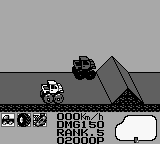
Monster Truck (Japan) is a racing game released for the Game Boy. This title was developed in Japan, although specific details about the developer are not widely documented. As a part of the Game Boy's library, it reflects the arcade racing genre that was popular during the handheld's heyday in the early 1990s, focusing on vehicular competition and off-road challenges.
In Monster Truck, players take control of a monster truck and navigate through various racing tracks. The gameplay centers around racing against opponents while overcoming obstacles and utilizing power-ups to gain advantages. The controls are straightforward, making it accessible for players, yet the challenge ramps up as the tracks become more complex and competitive.
This game is worth exploring for those interested in retro racing titles, especially fans of the Game Boy's unique offerings. While it may not have the same level of recognition as other racing games from the era, it provides a nostalgic experience that captures the spirit of arcade racing. Its simplicity and focus on fun gameplay make it a charming addition to any retro gaming collection, particularly for those who appreciate lesser-known gems from the Game Boy library.
GAME INFO
How to play Monster Truck online
To get started with Monster Truck, begin by selecting your vehicle and track from the main menu, which is in Japanese. Familiarize yourself with the controls, as they will be essential in navigating the race tracks. The core gameplay loop involves racing against opponents while avoiding obstacles and utilizing power-ups to enhance your performance.
As you progress through the game, focus on mastering the controls and learning the layout of each track. Timing your jumps and using power-ups effectively can make a significant difference in your racing strategy. Be prepared for varying terrain types that will challenge your driving skills, and remember that practice will help improve your performance in races.
CONTROLS
Controls
- Arrow Keys — D-Pad / Movement
- X — A button (jump / confirm)
- S — B button (run / attack / cancel)
- Enter — Start / Pause
- V — Select
Monster Truck FAQ
Is Monster Truck exclusive to Game Boy or did it appear on other systems?
The game is exclusive to the Game Boy platform and did not see releases on other systems.
Does Monster Truck have a multiplayer or co-op mode?
There is no multiplayer or co-op mode available in Monster Truck; the gameplay is designed for single-player racing experiences.
Who developed Monster Truck?
The specific developer of Monster Truck is not widely documented, leaving some uncertainty regarding its origins.












COMMENTS (0)
No comments yet. Be the first to share your thoughts.