The game loads when you press Play · press “Play Now” inside the game if it asks.
Mini 4 Boy (Japan)
Mini 4 Boy
Mini 4 Boy: GB Racing
Mini 4 Boy is a racing game released exclusively in Japan for the Game Boy. The game was developed during the early 1990s, a time when handheld gaming was gaining momentum. It reflects the genre conventions of its era, focusing on simple yet engaging racing mechanics that were popular on the platform.
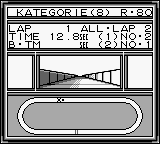
In Mini 4 Boy, players engage in racing miniature vehicles, navigating various tracks and overcoming obstacles. The game typically features a top-down perspective, allowing players to see the entire track layout as they control their vehicle. While specific mechanics and features may not be widely documented, the gameplay likely involves competing against AI opponents and mastering tracks to achieve the best times.
What makes Mini 4 Boy an interesting title today is its niche appeal within the racing genre on the Game Boy. It may not have the widespread recognition of larger franchises, but it offers a unique experience for retro gaming enthusiasts. If you enjoy exploring lesser-known titles or have a fondness for racing games, this one is worth a try, especially for collectors looking to complete their Game Boy library.
GAME INFO
More Mini 4 Boy Games
Ready for another round? Explore more Mini 4 Boy games and console editions. Choose a game below to play it on its own page.
How to play Mini 4 Boy online
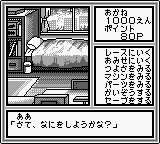
Getting started in Mini 4 Boy involves selecting your vehicle and the track you want to race on. Since the game is in Japanese, navigating the menus may require some familiarity with the language or a bit of trial and error. Once you’ve selected your options, you’ll engage in a series of races against AI opponents.
The core gameplay loop revolves around mastering the controls to navigate the tracks effectively. Players will need to focus on timing their movements and utilizing power-ups or boosts that may be available. Understanding the layout of each track and the vehicle's handling characteristics will be crucial to securing victories and improving lap times.
CONTROLS
Controls
- Arrow Keys — D-Pad / Movement
- X — A button (jump / confirm)
- S — B button (run / attack / cancel)
- Enter — Start / Pause
- V — Select
Mini 4 Boy FAQ
Is Mini 4 Boy exclusive to Game Boy or did it appear on other systems?
The game is exclusive to the Game Boy and did not receive releases on other systems.
In what year was Mini 4 Boy originally released?
The release year for Mini 4 Boy is not widely documented, making it difficult to provide a specific date.
Which regions was Mini 4 Boy released in?
Mini 4 Boy was released exclusively in Japan.












COMMENTS (0)
No comments yet. Be the first to share your thoughts.