The game loads when you press Play · press “Play Now” inside the game if it asks.
Minesweeper - Soukaitei (Japan)
Minesweeper - Soukaitei
What is Minesweeper - Soukaitei?
Minesweeper - Soukaitei is a puzzle game for the Game Boy, released in Japan. This title is a localized version of the classic Minesweeper game, which gained popularity on PCs in the 1990s. The Game Boy adaptation retains the core essence of the original while providing a portable experience for fans of the genre.
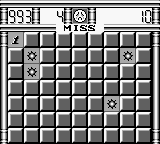
In this game, players navigate a grid filled with hidden mines. The objective is to uncover all the safe squares without detonating any mines. Players receive numerical clues indicating how many mines are adjacent to each square they reveal. The gameplay revolves around logical deduction, as players must use these clues to avoid mines and clear the grid successfully.
Today, Minesweeper - Soukaitei holds a niche place in retro gaming collections. While it may not have the depth of more complex puzzle games, it offers a simple yet engaging challenge that can be appreciated by fans of logic puzzles. Its accessibility and straightforward mechanics make it a great addition to any Game Boy library, especially for those looking to revisit a classic puzzle experience on the go.
GAME INFO
How to play Minesweeper - Soukaitei online
To get started with Minesweeper - Soukaitei, navigate the main menu using the D-Pad and select options with the A button. Since this title is in Japanese, you may need to familiarize yourself with the menu layout to access the game modes. Once you start a game, the grid will appear, and your goal is to uncover squares without hitting mines.
The core gameplay loop involves revealing squares based on the numerical clues provided. Each number indicates how many mines are in the adjacent squares, helping you deduce safe spots to click next. Pay attention to the numbers and use logic to avoid mines while clearing the grid. Be cautious as you play, and remember that careful planning is key to mastering the game.
CONTROLS
Controls
- Arrow Keys — D-Pad / Movement
- X — A button (jump / confirm)
- S — B button (run / attack / cancel)
- Enter — Start / Pause
- V — Select
Minesweeper - Soukaitei FAQ
Who developed Minesweeper - Soukaitei?
Information about the specific developer of Minesweeper - Soukaitei is not widely documented.
Does Minesweeper - Soukaitei have a multiplayer or co-op mode?
Minesweeper - Soukaitei does not feature any multiplayer or co-op modes; it is designed as a single-player experience.
Can players save progress in Minesweeper - Soukaitei?
The game does not include a save feature, which means players must complete their session in one sitting.












COMMENTS (0)
No comments yet. Be the first to share your thoughts.