The game loads when you press Play · press “Play Now” inside the game if it asks.
Mickey Mouse - Magic Wand (USA, Europe)
Mickey Mouse - Magic Wand
What is Mickey Mouse - Magic Wand?
- Game Boy
- Platformer
- 5· 0 votes
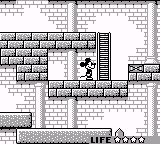
Mickey Mouse - Magic Wand is a platformer game released for the Game Boy in both the USA and Europe. This title, developed during the early 90s, reflects the era's charm and simplicity in game design. Based on the beloved Disney character Mickey Mouse, it combines whimsical visuals with engaging gameplay, typical of many licensed titles from that time.
In this game, players control Mickey as he navigates through various levels filled with obstacles and enemies. The primary mechanic revolves around using a magic wand, allowing Mickey to interact with the environment in unique ways. Players will jump, run, and attack while solving puzzles, which is a hallmark of platformers from this generation, providing a straightforward yet enjoyable experience.
Today, Mickey Mouse - Magic Wand holds a nostalgic value for fans of retro gaming. While it may not be the most groundbreaking title, it captures the essence of early 90s platforming with its colorful graphics and accessible gameplay. It shares similarities with other Disney-themed games of its time, making it a charming addition to any retro collection, especially for those fond of platformers featuring iconic characters.
GAME INFO
- Platform
- Game Boy
- Genre
- Platformer
- Players
- 1
- Region
- USA, Europe
How to play Mickey Mouse - Magic Wand online
To get started with Mickey Mouse - Magic Wand, first, choose the game from your emulator or gaming console. The initial screen will guide you to start your adventure as Mickey. As you begin playing, familiarize yourself with the controls and the basic mechanics, as this will be essential to progressing through the levels.
The core loop involves navigating through various stages, defeating enemies, and solving puzzles using Mickey's magic wand. Collect items and power-ups to enhance your abilities. Pay attention to the different types of obstacles you encounter, as each requires a unique approach. Mastering these mechanics will be key to enjoying the game and advancing further.
CONTROLS
Controls
- Arrow Keys — D-Pad / Movement
- X — A button (jump / confirm)
- S — B button (run / attack / cancel)
- Enter — Start / Pause
- V — Select
Mickey Mouse - Magic Wand FAQ
Can players save progress in Mickey Mouse - Magic Wand?
Saving progress in this game is not widely documented, and it appears players may need to complete levels in one sitting.
In what year was Mickey Mouse - Magic Wand originally released?
The specific release year for Mickey Mouse - Magic Wand is not widely documented, making it difficult to provide an exact date.
Is Mickey Mouse - Magic Wand exclusive to Game Boy or did it appear on other systems?
This title is primarily known for its release on the Game Boy, and there is no widely documented evidence of it appearing on other systems.
You may also like
All Game Boy games











GAME INFO
- Platform
- Game Boy
- Genre
- Platformer
- Players
- 1
- Region
- USA, Europe
COMMENTS (0)
No comments yet. Be the first to share your thoughts.