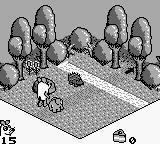
The game loads when you press Play · press “Play Now” inside the game if it asks.
Maus, Die (Europe) (En,Fr,De,Es)
Maus, Die
Maus, Die - Platformer Classic
- Game Boy
- Platformer
- 5· 0 votes
GAME INFO
- Platform
- Game Boy
- Genre
- Platformer
- Players
- 1
- Region
- Europe
How to play Maus, Die online
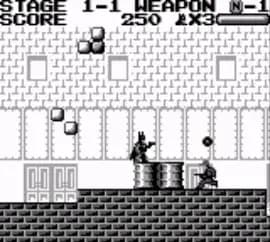
Getting started in Maus, Die involves selecting your language preference at the beginning. Once in-game, you will navigate through levels filled with various obstacles and enemies. The core loop consists of jumping over hazards, collecting items, and defeating enemies to progress through the stages.
As you play, mastering the controls is key to overcoming challenges. Timing your jumps and knowing when to run can make a significant difference in your performance. Pay attention to the layout of each level, as some may require specific strategies to successfully navigate through them. Familiarize yourself with the mechanics early on to enjoy a smoother gameplay experience.
CONTROLS
Controls
- Arrow Keys — D-Pad / Movement
- X — A button (jump / confirm)
- S — B button (run / attack / cancel)
- Enter — Start / Pause
- V — Select
Maus, Die FAQ
Which regions was Maus, Die released in?
Maus, Die was released in Europe and is localized in multiple languages including English, French, German, and Spanish.
Is Maus, Die exclusive to Game Boy or did it appear on other systems?
The game appears to be exclusive to the Game Boy, with no known releases on other platforms.
Who developed Maus, Die?
Information regarding the specific developer of Maus, Die is not widely documented, leaving its origins somewhat unclear.
You may also like
All Game Boy games
GAME INFO
- Platform
- Game Boy
- Genre
- Platformer
- Players
- 1
- Region
- Europe
COMMENTS (0)
No comments yet. Be the first to share your thoughts.