CHOOSE A VERSION
2 versions · same consoleChoose an original release, regional version, revision, bootleg or clearly labelled ROM hack/mod, then press Play. Hacks may change the gameplay. Switching versions restarts the player.
Selected: Default · USA · USA
The game loads when you press Play · press “Play Now” inside the game if it asks.
Maru's Mission (USA)
Maru's Mission
Maru's Mission: GB Platformer
- Game Boy
- Platformer
- 5· 0 votes
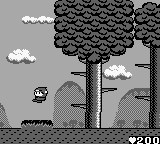
Maru's Mission (USA) is a platformer game released on the Game Boy. It was developed by a lesser-known team and is notable for its unique mechanics and colorful graphics typical of the genre during the handheld era. While the release date is not widely documented, the game falls into the category of official releases that were part of the Game Boy's extensive library.
In Maru's Mission, players control a character navigating through various levels filled with obstacles and enemies. The gameplay is centered around platforming mechanics where jumping and running are essential to progress. Players must collect items and defeat foes while exploring different environments, which is a hallmark of platform games released during this time.
This title is worth exploring for those who appreciate the charm of retro platformers. While it may not be as well-known as Mario or other flagship titles, it offers a nostalgic experience that reflects the creativity of its era. The game provides a simple yet engaging challenge, making it a decent addition to any Game Boy collection, especially for players interested in lesser-known gems.
GAME INFO
- Platform
- Game Boy
- Genre
- Platformer
- Publisher
- Jaleco
- Developer
- Tose Co.
- Released
- 1990
- Players
- 1
- Region
- USA
How to play Maru's Mission online
Getting started in Maru's Mission involves familiarizing yourself with the controls and the game's objectives. Begin by navigating the first level, where you'll encounter basic obstacles and enemies. The core gameplay loop revolves around jumping across platforms, avoiding hazards, and collecting items that aid in your progression.
As you move through the levels, pay attention to the layout and enemy patterns. Timing your jumps is crucial to avoiding pitfalls and engaging enemies effectively. While the game is straightforward, mastering the mechanics will enhance your experience and make it more enjoyable. Take your time to explore each level thoroughly to uncover hidden items and secrets.
CONTROLS
Controls
- Arrow Keys — D-Pad / Movement
- X — A button (jump / confirm)
- S — B button (run / attack / cancel)
- Enter — Start / Pause
- V — Select
Maru's Mission FAQ
Who developed Maru's Mission?
The developer of Maru's Mission is not widely documented, leaving some uncertainty about the team behind it.
In what year was Maru's Mission originally released?
The original release year for Maru's Mission is not widely documented, making it difficult to provide a specific date.
Is Maru's Mission exclusive to Game Boy or did it appear on other systems?
Maru's Mission appears to be exclusive to the Game Boy and has not been released on other systems.
You may also like
All Game Boy games











GAME INFO
- Platform
- Game Boy
- Genre
- Platformer
- Publisher
- Jaleco
- Developer
- Tose Co.
- Released
- 1990
- Players
- 1
- Region
- USA
COMMENTS (0)
No comments yet. Be the first to share your thoughts.