The game loads when you press Play · press “Play Now” inside the game if it asks.
Lingo (Europe) (En,Fr,De,Nl)
Lingo
What is Lingo?
- Game Boy
- Educational
- 5· 0 votes
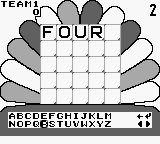
Lingo (Europe) (En,Fr,De,Nl) is a language-based puzzle game released on the Game Boy. It was developed by an unknown studio and published in Europe, catering to players who enjoy word games. The title is notable for its multilingual support, allowing players to engage in gameplay in English, French, German, and Dutch, which adds a unique twist to the educational puzzle genre.
In Lingo, players are tasked with guessing words based on letter hints and a limited number of attempts. The game presents a series of clues and players must fill in the correct letters to form valid words. This creates a mix of strategy and language skills, as players need to think critically about their guesses while also being mindful of the language they are playing in.
What makes Lingo worth exploring today is its nostalgic appeal and its place within the educational gaming niche. While it may not have the flashy graphics or complexity of other titles from the era, it offers a simple yet engaging experience that can be both fun and enlightening. For fans of word games or those looking to brush up on their language skills, Lingo provides a charming way to do so while enjoying the retro gaming experience on the Game Boy.
GAME INFO
- Platform
- Game Boy
- Genre
- Educational
- Publisher
- Philips Interactive Media, Inc.
- Developer
- The Vision Factory
- Released
- 1994
- Players
- 1
- Region
- Europe
How to play Lingo online
To get started with Lingo, select your preferred language from the main menu. After that, you will enter the game interface where you’ll see a series of letters and must guess the correct word. The core gameplay loop involves making guesses based on the letters presented, with feedback given after each guess to help narrow down the possibilities.
As you play, keep an eye on the number of attempts allowed for each word. It’s essential to think strategically about your guesses, considering common letter patterns and the rules of the language you are playing in. Familiarize yourself with the game's mechanics early on, as this will help you to maximize your chances of guessing correctly and progressing through the levels.
CONTROLS
Controls
- Arrow Keys — D-Pad / Movement
- X — A button (jump / confirm)
- S — B button (run / attack / cancel)
- Enter — Start / Pause
- V — Select
Lingo FAQ
Who developed Lingo?
Information about the developer of Lingo is not widely documented.
In what year was Lingo originally released?
The original release year of Lingo is not widely documented.
Is Lingo considered easy to pick up or challenging?
Lingo is generally considered easy to pick up, making it accessible for players of various skill levels. However, the challenge can increase depending on the complexity of the words and the player's language proficiency.
You may also like
All Game Boy games











GAME INFO
- Platform
- Game Boy
- Genre
- Educational
- Publisher
- Philips Interactive Media, Inc.
- Developer
- The Vision Factory
- Released
- 1994
- Players
- 1
- Region
- Europe
COMMENTS (0)
No comments yet. Be the first to share your thoughts.