The game loads when you press Play · press “Play Now” inside the game if it asks.
Jelly Boy (Europe)
Jelly Boy
Jelly Boy - Platformer Classic
- Game Boy
- Platformer
- 5· 0 votes
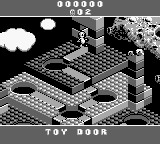
Jelly Boy (Europe) is a platform game released for the Game Boy. Developed by the team at Ocean Software, it debuted in the early 1990s, a time when the Game Boy was establishing itself as a popular handheld console. This title is notable for its quirky art style and unique mechanics that set it apart from other platformers of its era.
In Jelly Boy, players control a jelly-like character who navigates through various levels filled with obstacles, enemies, and puzzles. The gameplay revolves around platforming elements, where players must jump, run, and interact with the environment to progress. Collecting power-ups and avoiding hazards is essential, as the game encourages exploration and experimentation with its mechanics, making it a fun challenge for fans of the genre.
Though Jelly Boy may not be as widely recognized as other platformers from the same period, it has its charm and offers a fresh take on the platforming formula. The game's whimsical design and unique character mechanics provide a different flavor compared to more mainstream titles. For those who appreciate retro games, Jelly Boy is worth trying, especially for its nostalgic appeal and its place in the diverse library of Game Boy titles.
GAME INFO
- Platform
- Game Boy
- Genre
- Platformer
- Publisher
- Ocean Software
- Developer
- Acclaim Studios London
- Released
- 1994
- Players
- 1
- Region
- Europe
More Jelly Boy Games
Ready for another round? Explore more Jelly Boy games and console editions. Choose a game below to play it on its own page.

How to play Jelly Boy online
Getting started with Jelly Boy involves familiarizing yourself with the basic controls and mechanics. Begin by navigating through the initial levels, which serve as a tutorial of sorts. Pay attention to the layout, as understanding the environment is crucial for overcoming challenges and defeating enemies.
As you progress, focus on collecting items and power-ups that enhance your abilities. The core loop consists of jumping between platforms, avoiding or defeating enemies, and solving simple puzzles to advance. Mastering the movement mechanics, such as timing your jumps, is key to successfully navigating Jelly Boy's whimsical world.
CONTROLS
Controls
- Arrow Keys — D-Pad / Movement
- X — A button (jump / confirm)
- S — B button (run / attack / cancel)
- Enter — Start / Pause
- V — Select
Jelly Boy FAQ
Which regions was Jelly Boy released in?
The game was released in Europe, and there is limited information regarding its availability in other regions.
What type of game is Jelly Boy?
It is primarily classified as a platformer, featuring mechanics typical of the genre such as jumping and obstacle navigation.
Does Jelly Boy have a multiplayer or co-op mode?
Jelly Boy is designed for single-player gameplay, and there are no known multiplayer or co-op modes available.
You may also like
All Game Boy games











GAME INFO
- Platform
- Game Boy
- Genre
- Platformer
- Publisher
- Ocean Software
- Developer
- Acclaim Studios London
- Released
- 1994
- Players
- 1
- Region
- Europe
COMMENTS (0)
No comments yet. Be the first to share your thoughts.