The game loads when you press Play · press “Play Now” inside the game if it asks.
Jeep Jamboree (USA)
Jeep Jamboree
What is Jeep Jamboree?
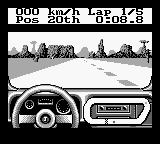
Jeep Jamboree (USA) is a racing game released for the Game Boy, capturing the essence of off-road driving. Developed during the early 90s, this title reflects the era's fascination with vehicular adventure and was published by an unknown entity, focusing on a unique niche in the racing genre. The game allows players to experience the thrill of navigating rough terrains in a Jeep, aiming to reach the finish line while overcoming various obstacles.
In Jeep Jamboree, players take control of a Jeep and must navigate through rugged landscapes, including hills and valleys. The gameplay involves racing against time while avoiding hazards that could slow you down. The mechanics emphasize precision driving, as players must carefully maneuver their vehicles to maintain speed and avoid getting stuck or crashing.
This title offers a nostalgic glimpse into retro racing games, ideal for those who appreciate its straightforward gameplay and classic graphics. While it may not be as complex as modern racing titles, Jeep Jamboree provides a simple yet satisfying experience for fans of the genre. Its charm lies in its simplicity, making it a worthwhile addition to any retro gaming library for those looking to explore lesser-known titles from the Game Boy era.
GAME INFO
How to play Jeep Jamboree online
To get started in Jeep Jamboree, begin by selecting your Jeep and the course you wish to tackle. The game presents various tracks, each with its own challenges and terrains. Familiarize yourself with the controls to navigate effectively and maintain speed throughout the race.
As you progress, focus on mastering the handling of your Jeep. The core loop involves racing against the clock while avoiding obstacles. Keep an eye out for shortcuts and remember that precision is key to achieving better times. Enjoy the simplicity of the game as you strive to improve your skills and complete each course.
CONTROLS
Controls
- Arrow Keys — D-Pad / Movement
- X — A button (jump / confirm)
- S — B button (run / attack / cancel)
- Enter — Start / Pause
- V — Select
Jeep Jamboree FAQ
Is there anything iconic or memorable about Jeep Jamboree?
The game is notable for its straightforward racing mechanics and nostalgic graphics typical of the early 90s. It captures the essence of off-road racing, which was a popular theme in gaming at the time.
Which regions was Jeep Jamboree released in?
This title was specifically released in the USA, catering to the American audience keen on off-road racing experiences. Information on its availability in other regions is not widely documented.
Is Jeep Jamboree exclusive to Game Boy or did it appear on other systems?
Jeep Jamboree is primarily recognized as a Game Boy title and does not appear to have been released on other gaming systems. Its legacy remains tied to the handheld platform.












COMMENTS (0)
No comments yet. Be the first to share your thoughts.