The game loads when you press Play · press “Play Now” inside the game if it asks.
Jankenman (Japan)
Jankenman
Jankenman on GB
GAME INFO
How to play Jankenman online
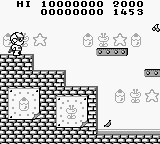
To get started with Jankenman, begin by selecting the start option from the main menu, which is in Japanese. The game will introduce you to the basic mechanics, so pay attention to the prompts. You will primarily be moving through levels and engaging in battles using the rock-paper-scissors mechanic.
The core loop involves navigating through stages, encountering enemies, and defeating them by choosing the correct gesture. As you progress, you'll need to adapt your strategy based on enemy patterns. Familiarizing yourself with the controls and the Japanese menus will help you enjoy this quirky title more effectively.
CONTROLS
Controls
- Arrow Keys — D-Pad / Movement
- X — A button (jump / confirm)
- S — B button (run / attack / cancel)
- Enter — Start / Pause
- V — Select
Jankenman FAQ
Who developed Jankenman?
The information regarding the developer of Jankenman is not widely documented, making it difficult to provide a definitive answer.
Does Jankenman have a multiplayer or co-op mode?
Jankenman does not feature a multiplayer or co-op mode. It is primarily a single-player experience focused on platforming and battles.
What makes Jankenman stand out among Game Boy titles of its era?
Its unique integration of the rock-paper-scissors mechanic into platforming gameplay sets Jankenman apart. This innovative approach offers a different experience compared to more traditional titles of the time.












COMMENTS (0)
No comments yet. Be the first to share your thoughts.