The game loads when you press Play · press “Play Now” inside the game if it asks.
J.League Live '95 (Japan)
J.League Live '95
Getting to Know J.League Live '95
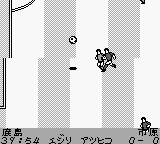
J.League Live '95 is a sports simulation game released exclusively in Japan for the Game Boy. Developed during the early days of portable gaming, it was part of the J.League series, which focused on soccer, a sport that has a massive following in Japan. The game reflects the era's emphasis on simple yet engaging sports mechanics, typical for the Game Boy platform.
In this title, players engage in soccer matches, controlling their team to compete against various opponents. The mechanics involve strategic plays, passing, and shooting, all designed to capture the essence of soccer on a handheld device. While the graphics are basic, the gameplay allows for a fun and competitive experience, emphasizing teamwork and tactics over flashy visuals.
Today, J.League Live '95 is a niche title that may not appeal to everyone, but it holds a special place for fans of retro sports games. It represents a time when sports games were finding their footing in the portable market. Compared to other sports titles of the era, it may lack depth but provides a nostalgic experience for players interested in the history of gaming and soccer in Japan.
GAME INFO
How to play J.League Live '95 online
To get started with J.League Live '95, power up your Game Boy and select the game from the menu. Since this title is Japanese-only, players will encounter menus and options in Japanese. Familiarize yourself with the basic functions and navigate through the initial settings to choose your team and begin a match.
The core loop involves selecting your team, strategizing your plays, and competing in matches. You'll control players during the game to pass, shoot, and defend. Understanding the controls and practicing your timing will be crucial for success. Remember to pay attention to your stamina and use tactical plays to outmaneuver your opponents.
CONTROLS
Controls
- Arrow Keys — D-Pad / Movement
- X — A button (jump / confirm)
- S — B button (run / attack / cancel)
- Enter — Start / Pause
- V — Select
J.League Live '95 FAQ
Who developed J.League Live '95?
Information about the specific developer of J.League Live '95 is not widely documented.
What type of game is J.League Live '95?
This title is a sports simulation game focused on soccer, designed for the Game Boy platform.
Does J.League Live '95 have a multiplayer or co-op mode?
Details on multiplayer options for J.League Live '95 are not widely documented, suggesting it may focus on single-player experiences.












COMMENTS (0)
No comments yet. Be the first to share your thoughts.