The game loads when you press Play · press “Play Now” inside the game if it asks.
InfoGenius Systems - Spell Checker and Calculator (USA)
InfoGenius Systems - Spell Checker and Calculator
About InfoGenius Systems - Spell Checker and Calculator
- Game Boy
- Educational
- 5· 0 votes
InfoGenius Systems - Spell Checker and Calculator is an educational title for the Game Boy that serves a unique purpose. Released in the USA, this game was designed to help players with spelling and basic calculations, making it stand out in a sea of action-packed games from the era. While not widely known, its niche appeal fits well within the educational genre, a category that saw several entries on the Game Boy during its lifespan.
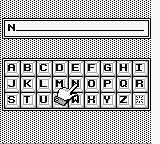
In gameplay, players engage with various spelling and calculation tasks, aimed at enhancing their skills. The interface is straightforward, allowing users to input words for spell-checking or numbers for calculations. Though it may not offer expansive mechanics or a storyline, its focus on educational content provides a practical experience for those looking to improve their language and math skills.
Today, InfoGenius Systems - Spell Checker and Calculator is worth exploring for retro gaming fans, particularly those interested in the educational titles of the Game Boy library. While it may not compete with more popular games from the platform, its simple yet effective approach to learning makes it a curious addition for collectors and enthusiasts. Its value lies in its ability to serve a functional purpose rather than just entertainment, reflecting a unique aspect of gaming history that prioritized education alongside play.
GAME INFO
- Platform
- Game Boy
- Genre
- Educational
- Players
- 1
- Region
- USA
How to play InfoGenius Systems - Spell Checker and Calculator online
Getting started with InfoGenius Systems - Spell Checker and Calculator, you will first encounter a simple menu that allows you to choose between spelling and calculation modes. The core gameplay loop revolves around inputting words or numbers, which the game will then process to provide feedback. As you navigate through the options, you will find that the design is user-friendly, making it accessible for players of all ages.
It's important to familiarize yourself with how to enter your inputs correctly, as the game relies on precise spellings and calculations to function effectively. The educational focus means that the more you practice, the better you will become at both spelling and mathematics. Take your time with each task, as the game is designed to support gradual learning rather than rapid completion.
CONTROLS
Controls
- Arrow Keys — D-Pad / Movement
- X — A button (jump / confirm)
- S — B button (run / attack / cancel)
- Enter — Start / Pause
- V — Select
InfoGenius Systems - Spell Checker and Calculator FAQ
Can players save progress in InfoGenius Systems - Spell Checker and Calculator?
There is no widely documented method for saving progress in this title, as it primarily functions as an educational tool rather than a traditional game with save features.
Does InfoGenius Systems - Spell Checker and Calculator have a multiplayer or co-op mode?
This game does not include any multiplayer or co-op modes. It is designed for single-player use, focusing on individual learning experiences.
Is there anything iconic or memorable about InfoGenius Systems - Spell Checker and Calculator?
While not particularly iconic, the game is memorable for its unique educational approach on the Game Boy platform, catering to players interested in improving their spelling and calculation skills rather than offering typical gaming experiences.
You may also like
All Game Boy games











GAME INFO
- Platform
- Game Boy
- Genre
- Educational
- Players
- 1
- Region
- USA
COMMENTS (0)
No comments yet. Be the first to share your thoughts.