The game loads when you press Play · press “Play Now” inside the game if it asks.
Hong Kong (Japan)
Hong Kong
Hong Kong on GB
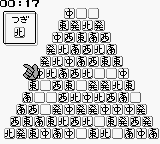
Hong Kong (Japan) is a game released on the Game Boy platform, known for its action genre. While specific details about the developer and publisher remain elusive, it is recognized as a title from the classic era of handheld gaming in the early 90s. This game is not widely known outside of niche communities, making it a hidden gem for dedicated retro enthusiasts.
In terms of gameplay, players navigate through various levels, engaging in combat and overcoming obstacles. The mechanics are reflective of typical action games of the period, where timing and precision are critical to success. Players must defeat enemies and avoid traps, all while progressing through the stages, which are designed to challenge their reflexes and strategic thinking.
Today, Hong Kong (Japan) is worth trying for its nostalgic value and its representation of early Game Boy titles. While it may not have the same level of recognition as other major franchises, it offers a glimpse into the action genre's development during the handheld revolution. Players who appreciate retro gaming will find its simplicity and challenge appealing, even if it lacks the depth of more well-known titles from the same era.
GAME INFO
More Hong Kong Games
Ready for another round? Explore more Hong Kong games and console editions. Choose a game below to play it on its own page.

How to play Hong Kong online
Getting started with Hong Kong (Japan) involves selecting your game mode from the main menu, which is primarily in Japanese. Once you’re in, you will control your character through a series of levels. The core loop revolves around defeating enemies and navigating through different terrains, which can require both skill and timing to master.
As you progress, pay attention to enemy patterns and the layout of each stage. Learning the controls and mastering your character's movements is crucial. While the menus might be in Japanese, basic navigation is relatively intuitive, and players familiar with action games will quickly adapt to the gameplay mechanics.
CONTROLS
Controls
- Arrow Keys — D-Pad / Movement
- X — A button (jump / confirm)
- S — B button (run / attack / cancel)
- Enter — Start / Pause
- V — Select
Hong Kong FAQ
What type of game is Hong Kong?
This title is classified as an action game, typical of the early Game Boy library. Players engage in combat and navigate through various levels filled with challenges.
Is Hong Kong exclusive to Game Boy or did it appear on other systems?
There is no widely documented evidence that Hong Kong was released on any other systems besides the Game Boy. It appears to be a title that is primarily associated with this handheld console.
Who developed Hong Kong?
Information about the specific developer of Hong Kong is not widely documented. As such, the details regarding its development remain unclear.












COMMENTS (0)
No comments yet. Be the first to share your thoughts.