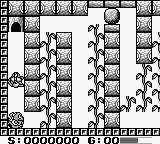
The game loads when you press Play · press “Play Now” inside the game if it asks.
Godzilla-kun (Japan)
Godzilla-kun
What is Godzilla-kun?
- Game Boy
- Platformer
- 5· 0 votes
Godzilla-kun for the Game Boy is a unique title released exclusively in Japan. Developed by Toho, this game belongs to the platformer genre and features the iconic kaiju, Godzilla. It was released during a time when many games were beginning to embrace character-driven narratives and whimsical art styles, making it a notable entry in the Game Boy's library.
In Godzilla-kun, players take control of Godzilla, but with a twist. The gameplay revolves around navigating through various levels while dealing with a mix of platforming challenges and light puzzle elements. Players encounter different enemies and obstacles that require strategic thinking and dexterity to overcome, creating a fun blend of action and problem-solving throughout the game.
This title holds a special place for fans of retro gaming and Godzilla lore. While it may not have the same recognition as other platformers of its time, its charm lies in its simplicity and nostalgic appeal. For those who enjoy quirky platformers or are fans of the Godzilla franchise, Godzilla-kun offers a delightful experience that showcases the creativity of early handheld gaming without being overly complex or demanding.
GAME INFO
- Platform
- Game Boy
- Genre
- Platformer
- Released
- 1990
- Players
- 1
- Region
- Japan
How to play Godzilla-kun online
Getting started in Godzilla-kun involves selecting your game mode from the main menu, which is in Japanese. The first level introduces players to the basic mechanics, where you jump and run through stages while defeating enemies. Players will need to familiarize themselves with the controls to navigate the levels effectively.
As you progress, you'll encounter different challenges and collect items that can enhance your abilities. Pay attention to the layout of each stage, as some areas may require specific strategies to overcome. The game encourages exploration and experimentation, so don't hesitate to try different approaches to tackle the obstacles you face.
CONTROLS
Controls
- Arrow Keys — D-Pad / Movement
- X — A button (jump / confirm)
- S — B button (run / attack / cancel)
- Enter — Start / Pause
- V — Select
Godzilla-kun FAQ
Is Godzilla-kun considered easy to pick up or challenging?
The game is generally easy to pick up, making it accessible for new players. However, some levels may present a challenge as you advance, requiring practice and timing.
Can players save progress in Godzilla-kun?
There is no save feature in Godzilla-kun, so players must complete levels in one sitting. This means you need to be prepared for a complete playthrough each time you start the game.
Is Godzilla-kun exclusive to Game Boy or did it appear on other systems?
Godzilla-kun was exclusively released for the Game Boy and did not appear on other systems. Its unique gameplay and charm make it a distinctive title for this platform.
You may also like
All Game Boy games











GAME INFO
- Platform
- Game Boy
- Genre
- Platformer
- Released
- 1990
- Players
- 1
- Region
- Japan
COMMENTS (0)
No comments yet. Be the first to share your thoughts.