The game loads when you press Play · press “Play Now” inside the game if it asks.
GB Pachi-Slot Hisshouhou! Jr (Japan)
GB Pachi-Slot Hisshouhou! Jr
Inside GB Pachi-Slot Hisshouhou! Jr
- Game Boy
- Simulation
- 5· 0 votes
GAME INFO
- Platform
- Game Boy
- Genre
- Simulation
- Players
- 1
- Region
- Japan
How to play GB Pachi-Slot Hisshouhou! Jr online
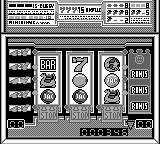
Getting started in GB Pachi-Slot Hisshouhou! Jr is quite simple. Begin by inserting virtual coins into the pachislot machine using the designated controls. Once you have your coins in, pull the lever to start the reels spinning and hope for matching symbols to align for a payout.
The core loop revolves around trying to achieve winning combinations while managing your coin count. Keep an eye on the symbols and their arrangements, as this will determine your success. Since this title is in Japanese, familiarize yourself with basic terms or use visual cues to navigate menus effectively.
CONTROLS
Controls
- Arrow Keys — D-Pad / Movement
- X — A button (jump / confirm)
- S — B button (run / attack / cancel)
- Enter — Start / Pause
- V — Select
GB Pachi-Slot Hisshouhou! Jr FAQ
Is GB Pachi-Slot Hisshouhou! Jr exclusive to Game Boy or did it appear on other systems?
This game is exclusive to the Game Boy and did not see releases on other platforms. It was specifically designed for the handheld experience, which suited the pachislot theme well.
Which regions was GB Pachi-Slot Hisshouhou! Jr released in?
The game was released solely in Japan, catering to the local audience that enjoys pachislot games. There are no known releases in other regions, making it a unique find for collectors outside Japan.
Who developed GB Pachi-Slot Hisshouhou! Jr?
Information about the specific developer is not widely documented. However, it is known that the game was developed during a time when many similar titles were being produced for the Game Boy in Japan.
You may also like
All Game Boy games











GAME INFO
- Platform
- Game Boy
- Genre
- Simulation
- Players
- 1
- Region
- Japan
COMMENTS (0)
No comments yet. Be the first to share your thoughts.