The game loads when you press Play · press “Play Now” inside the game if it asks.
Fire Fighter (Europe)
Fire Fighter
Inside Fire Fighter
Fire Fighter (Europe) is a classic action game released for the Game Boy. It made its debut in the early 1990s, a time when portable gaming was gaining traction and developers were exploring various genres. This title is notable for its straightforward premise and engaging gameplay, typical of the era's offerings on the Game Boy platform.
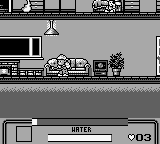
In Fire Fighter, players take on the role of a firefighter, navigating through various levels to rescue civilians trapped in burning buildings. The gameplay revolves around using a water hose to put out fires while avoiding obstacles and hazards that could impede progress. Players must manage their water supply carefully, as running out can leave them vulnerable to the flames and the challenges that lie ahead.
While Fire Fighter may not be as widely recognized as other titles from the same period, it provides a charming slice of retro gaming. Its simple mechanics and niche theme make it a unique experience, especially for those interested in the evolution of action games. The game's straightforward nature can appeal to both nostalgic players and newcomers looking for an accessible introduction to retro gaming on the Game Boy.
GAME INFO
How to play Fire Fighter online
To get started with Fire Fighter, first choose your game mode and begin the mission. The core loop involves moving through levels filled with fires and rescuing civilians. You will need to navigate obstacles while managing your water supply effectively to douse the flames and progress.
As you play, focus on mastering the controls to maneuver quickly around hazards and make strategic decisions about when to use your water. Pay attention to the layout of each level, as some may require you to think ahead to save all the civilians while conserving your resources. Familiarizing yourself with the controls and level designs will enhance your overall experience.
CONTROLS
Controls
- Arrow Keys — D-Pad / Movement
- X — A button (jump / confirm)
- S — B button (run / attack / cancel)
- Enter — Start / Pause
- V — Select
Fire Fighter FAQ
Is Fire Fighter exclusive to Game Boy or did it appear on other systems?
It appears that Fire Fighter was primarily released for the Game Boy, and there is no widely documented evidence of it being available on other systems.
Does Fire Fighter have a multiplayer or co-op mode?
The game does not feature a multiplayer or co-op mode; it is designed for single-player gameplay only.
Who developed Fire Fighter?
The developer of Fire Fighter is not widely documented, and information regarding the specific team behind its creation remains scarce.












COMMENTS (0)
No comments yet. Be the first to share your thoughts.