The game loads when you press Play · press “Play Now” inside the game if it asks.
Fastest Lap (Japan, USA)
Fastest Lap
Fastest Lap on GB
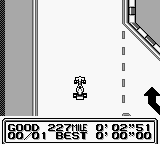
Fastest Lap is a racing game released for the Game Boy, a handheld console developed by Nintendo. It was available in both Japan and the USA, capturing the essence of competitive racing during the early 90s. This title represents the genre well, offering players a chance to experience fast-paced racing action on a portable platform.
In Fastest Lap, players engage in a straightforward racing format, aiming to complete laps as quickly as possible. The gameplay focuses on timing and precision, as players navigate through various tracks, dealing with turns and obstacles. The mechanics are typical of racing games of the era, emphasizing skillful driving and quick reflexes to achieve the best lap times.
Today, Fastest Lap is a notable title for retro gaming enthusiasts, particularly for those interested in the evolution of racing games. While it may not have the depth or polish of more modern titles, it holds a nostalgic charm for players who appreciate the simplicity and challenge of classic racing games. It stands as a reminder of the early days of portable gaming, where fun and accessibility were key components of game design.
GAME INFO
How to play Fastest Lap online
Getting started with Fastest Lap involves selecting your racing mode and track. Once in the game, you'll be tasked with racing against the clock or other competitors, depending on the mode chosen. The core loop revolves around mastering the controls to optimize your lap times, so practice is essential to improve your skills.
As you race, keep an eye on your speed and handling. Tight corners and quick accelerations require focus. Although the game’s menus are in Japanese, navigating them is relatively straightforward. Familiarize yourself with the layout of the tracks, and you'll find it easier to shave seconds off your lap times.
CONTROLS
Controls
- Arrow Keys — D-Pad / Movement
- X — A button (jump / confirm)
- S — B button (run / attack / cancel)
- Enter — Start / Pause
- V — Select
Fastest Lap FAQ
Is there anything iconic or memorable about Fastest Lap?
The game is remembered for its straightforward racing mechanics and nostalgic appeal among Game Boy titles. It captures the essence of handheld racing games of the era, making it a fun experience for retro enthusiasts.
Does Fastest Lap have a multiplayer or co-op mode?
Fastest Lap does not include a multiplayer or co-op mode, focusing instead on single-player racing experiences. The game emphasizes individual skill in achieving the fastest lap times.
Who developed Fastest Lap?
The developer of Fastest Lap is not widely documented. Information about the specific development team behind this title remains scarce.












COMMENTS (0)
No comments yet. Be the first to share your thoughts.