The game loads when you press Play · press “Play Now” inside the game if it asks.
Druaga no Tou (Japan)
Druaga no Tou
Inside Druaga no Tou
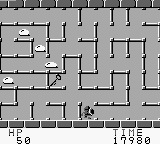
Druaga no Tou, released for the Game Boy in Japan, is an action-adventure game that is part of a larger series originally created by Namco. This title is known for its dungeon-crawling elements and puzzle-solving mechanics, typical of the era's games. While it maintains the charm of classic titles, it's important to note that it may be less known outside of Japan, primarily due to language barriers and its niche appeal.
In Druaga no Tou, players navigate through various levels of a tower, battling enemies and solving puzzles to progress. The game emphasizes exploration and item collection, a common theme in adventure games of the time. Players must utilize their skills to overcome obstacles and defeat foes, often requiring a mix of strategy and quick reflexes to succeed.
This game is worth trying for those interested in retro gaming or fans of the action-adventure genre. While it may not have the widespread recognition of other titles, it offers a unique glimpse into the design philosophies of early handheld gaming. Its blend of action and puzzles keeps gameplay engaging, making it a solid addition to any retro collection, especially for those who appreciate the history of gaming on the Game Boy.
GAME INFO
How to play Druaga no Tou online
Getting started in Druaga no Tou involves familiarizing yourself with the game's controls and mechanics. Players will first find themselves at the base of the tower, where they must begin their ascent. The core loop revolves around exploring levels, defeating enemies, and collecting items that will aid in progression.
As you navigate through the tower, remember that the menus are in Japanese, which may pose a challenge for non-Japanese speakers. Pay attention to the items you collect and the enemies you encounter, as each level presents unique puzzles and adversaries. Understanding the mechanics and experimenting with different strategies will enhance your experience and help you tackle the challenges ahead.
CONTROLS
Controls
- Arrow Keys — D-Pad / Movement
- X — A button (jump / confirm)
- S — B button (run / attack / cancel)
- Enter — Start / Pause
- V — Select
Druaga no Tou FAQ
What type of game is Druaga no Tou?
It's an action-adventure game that combines elements of puzzle-solving with dungeon exploration, typical of the genre during its release era.
Does Druaga no Tou have a multiplayer or co-op mode?
This game is designed for single-player experience only, focusing on individual exploration and challenges within the tower.
Is Druaga no Tou considered easy to pick up or challenging?
The game can be challenging, particularly for players unfamiliar with the genre, as it requires strategic thinking and quick reflexes to advance through the levels.












COMMENTS (0)
No comments yet. Be the first to share your thoughts.