The game loads when you press Play · press “Play Now” inside the game if it asks.
Dirty Racing (Japan)
Dirty Racing
About Dirty Racing
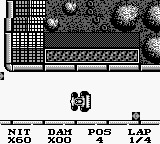
Dirty Racing is a racing game released for the Game Boy in Japan. This title falls under the racing genre and is notable for its unique approach to the gameplay mechanics typical of the period. The exact developer and publisher details are not widely documented, making it somewhat of a niche title in the retro gaming community.
In Dirty Racing, players engage in competitive races, navigating various tracks while managing speed and control. The game emphasizes the need for precision and timing, as players must avoid obstacles and other racers to secure victory. While specific mechanics may not be thoroughly detailed, the core gameplay aligns with what players expect from early handheld racing titles, focusing on straightforward racing action.
Today, Dirty Racing is worth exploring for those interested in the evolution of racing games on handheld consoles. It reflects the simplicity and charm of early Game Boy titles, making it a nostalgic experience for fans of the genre. Compared to other racing games from the same era, it might not offer the depth of modern titles, but it captures the essence of competitive racing in a compact format that can be enjoyable for casual play.
GAME INFO
How to play Dirty Racing online
Getting started in Dirty Racing involves selecting your track and preparing for a race. The menus are in Japanese, so familiarity with basic Japanese terms might help navigate options. Once you begin racing, focus on controlling your vehicle and mastering the tracks, as this will be crucial for winning races.
The core loop revolves around completing races against opponents. Players will need to manage their speed and utilize the controls effectively to dodge obstacles. As you race, keep an eye on your position relative to other racers and aim to finish in the top spots to progress through the game.
CONTROLS
Controls
- Arrow Keys — D-Pad / Movement
- X — A button (jump / confirm)
- S — B button (run / attack / cancel)
- Enter — Start / Pause
- V — Select
Dirty Racing FAQ
Who developed Dirty Racing?
Information about the developer of Dirty Racing is not widely documented, which leaves some uncertainty regarding its origins.
Can players save progress in Dirty Racing?
The game does not include a save feature, so players will need to complete races in one sitting without the ability to save their progress.
Is there anything iconic or memorable about Dirty Racing?
While not widely recognized, Dirty Racing offers a nostalgic glimpse into the early racing genre on handheld consoles, capturing the simplicity of its time.












COMMENTS (0)
No comments yet. Be the first to share your thoughts.