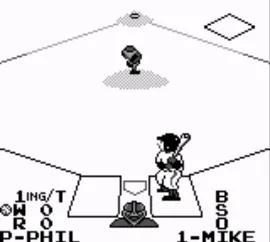
The game loads when you press Play · press “Play Now” inside the game if it asks.
Baseball (World)
Baseball
Getting to Know Baseball
GAME INFO
- Platform
- Game Boy
- Genre
- Sports
- Publisher
- Nintendo
- Developer
- Nintendo Research & Development 1
How to play Baseball online
To get started with Baseball (World), first, choose the game mode you wish to play. You can select between different teams and set up your match. Once in the game, you'll take turns batting and pitching, with the objective of scoring runs by hitting the ball and running around the bases.
The core loop revolves around pitching the ball, hitting it, and then running the bases to score. Timing and precision are key, as you’ll need to anticipate the pitch and make quick decisions. Keep an eye on your team’s performance, and remember that practice will help you improve your skills in this straightforward yet engaging baseball simulation.
CONTROLS
Controls
- Arrow Keys — D-Pad / Movement
- X — A button (jump / confirm)
- S — B button (run / attack / cancel)
- Enter — Start / Pause
- V — Select
Baseball FAQ
Which regions was Baseball released in?
The specific regions for Baseball (World) are not widely documented, making it difficult to confirm exact release areas.
Does Baseball have a multiplayer or co-op mode?
This title does not feature a multiplayer or co-op mode, focusing instead on single-player gameplay.
Roughly how long does it take to finish Baseball?
The time to finish Baseball can vary, but it typically takes a few hours to complete, depending on the player's skill level and familiarity with the game.
You may also like
All Game Boy games
GAME INFO
- Platform
- Game Boy
- Genre
- Sports
- Publisher
- Nintendo
- Developer
- Nintendo Research & Development 1
COMMENTS (0)
No comments yet. Be the first to share your thoughts.