CHOOSE A VERSION
2 versions · same consoleChoose an original release, regional version, revision, bootleg or clearly labelled ROM hack/mod, then press Play. Hacks may change the gameplay. Switching versions restarts the player.
Selected: Default · USA, Europe · USA, Europe
The game loads when you press Play · press “Play Now” inside the game if it asks.
Attack of the Killer Tomatoes (USA, Europe)
Attack of the Killer Tomatoes
Attack of the Killer Tomatoes on GB
- Game Boy
- Platformer
- 5· 0 votes
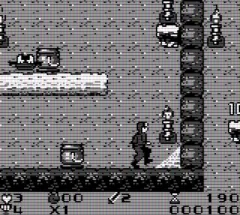
Attack of the Killer Tomatoes is a platformer game released for the Game Boy in the early 1990s. This title is based on the cult classic animated film of the same name and was developed by the now-defunct studio, Imagineering. The game was published in both the USA and Europe, fitting into the genre conventions of action-packed platformers of its time.
In the game, players navigate through various levels while battling tomato-themed enemies. The core gameplay involves jumping, running, and using different attack mechanics to defeat these quirky foes. Players must also collect items and power-ups that enhance their abilities, adding a layer of strategy to the gameplay. The levels are designed with a mix of platforming challenges and combat, typical for the genre, making it accessible yet engaging.
Today, Attack of the Killer Tomatoes holds a nostalgic charm for fans of retro gaming. While it may not be as renowned as other platformers from the era, it offers a unique blend of humor and action that makes it worth trying. The game's quirky theme and straightforward mechanics provide an enjoyable experience, especially for those who appreciate the lighter side of gaming history.
GAME INFO
- Platform
- Game Boy
- Genre
- Platformer
- Publisher
- THQ
- Developer
- Imagineering
- Released
- 1991
- Players
- 1
- Region
- USA, Europe
How to play Attack of the Killer Tomatoes online
To get started in Attack of the Killer Tomatoes, choose your character and begin your adventure. The levels are structured with various enemies to defeat and obstacles to navigate. Focus on collecting power-ups as you progress, which will improve your abilities and help you tackle tougher challenges.
As you play, master the timing of your jumps and attacks to efficiently dispatch enemies. The core loop involves moving through levels, defeating tomatoes, and progressing to the next stage. Pay attention to environmental hazards and enemy patterns to enhance your gameplay experience.
CONTROLS
Controls
- Arrow Keys — D-Pad / Movement
- X — A button (jump / confirm)
- S — B button (run / attack / cancel)
- Enter — Start / Pause
- V — Select
Attack of the Killer Tomatoes FAQ
Does Attack of the Killer Tomatoes have a multiplayer or co-op mode?
No, this game is designed for single-player gameplay only, focusing on individual challenges and obstacles.
Is Attack of the Killer Tomatoes exclusive to Game Boy or did it appear on other systems?
This game was primarily released for the Game Boy and is not widely documented as appearing on other systems.
What type of game is Attack of the Killer Tomatoes?
It is a platformer that combines action and humor, featuring levels filled with tomato-themed enemies and classic platforming mechanics.
You may also like
All Game Boy games











GAME INFO
- Platform
- Game Boy
- Genre
- Platformer
- Publisher
- THQ
- Developer
- Imagineering
- Released
- 1991
- Players
- 1
- Region
- USA, Europe
COMMENTS (0)
No comments yet. Be the first to share your thoughts.