CHOOSE A VERSION
3 versions · same consoleChoose an original release, regional version, revision, bootleg or clearly labelled ROM hack/mod, then press Play. Hacks may change the gameplay. Switching versions restarts the player.
Selected: Default · USA · USA
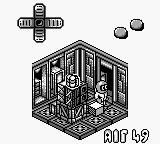
The game loads when you press Play · press “Play Now” inside the game if it asks.
Altered Space - A 3-D Alien Adventure (USA)
Altered Space - A 3-D Alien Adventure
Altered Space - A 3-D Alien Adventure - Action Classic
Altered Space - A 3-D Alien Adventure is a unique title for the Game Boy that was released in the USA. This game falls under the action-adventure genre, immersing players in a 3D alien world. While details about the developer and publisher are not widely documented, the game is recognized as an official release in the Game Boy library.
In Altered Space, players navigate a series of levels that blend platforming elements with exploration. The gameplay involves solving puzzles and overcoming obstacles as you encounter various alien creatures. The 3D perspective provides a distinct visual style for the time, creating a different experience compared to traditional 2D platformers.
This title is worth a try today for those interested in retro gaming or fans of the Game Boy's library. While it may not have the widespread recognition of other classics, its unique mechanics and alien-themed adventure make it an interesting addition. It offers a nostalgic glimpse into the experimentation of game design during the early 90s, appealing to both collectors and casual players alike.
GAME INFO
How to play Altered Space - A 3-D Alien Adventure online
Getting started in Altered Space involves familiarizing yourself with the controls and the game’s mechanics. Begin by moving your character around the initial area, which serves as a tutorial of sorts. Pay attention to the environment, as it will guide you through the objectives and challenges you’ll face.
As you progress, focus on solving puzzles and interacting with various elements in the game. The core loop revolves around exploration, puzzle-solving, and combat with alien creatures. Take your time to learn the layout of each level, as this knowledge will be crucial for overcoming obstacles and advancing through the game.
CONTROLS
Controls
- Arrow Keys — D-Pad / Movement
- X — A button (jump / confirm)
- S — B button (run / attack / cancel)
- Enter — Start / Pause
- V — Select
Altered Space - A 3-D Alien Adventure FAQ
Is Altered Space - A 3-D Alien Adventure an official release, a fan hack, a prototype, or another kind of build?
This game is an official release for the Game Boy, recognized as part of its library.
Is Altered Space - A 3-D Alien Adventure considered easy to pick up or challenging?
It offers a moderate challenge, requiring players to think critically about puzzle-solving and navigation while enjoying its unique 3D mechanics.
What type of game is Altered Space - A 3-D Alien Adventure?
This title is categorized as an action-adventure game, combining elements of exploration and puzzle-solving within a 3D environment.












COMMENTS (0)
No comments yet. Be the first to share your thoughts.