The game loads when you press Play · press “Play Now” inside the game if it asks.
Akazukin Chacha (Japan)
Akazukin Chacha
Akazukin Chacha - Action Classic
GAME INFO
How to play Akazukin Chacha online
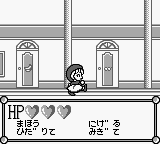
Getting started in Akazukin Chacha involves selecting your game mode from the main menu, which is in Japanese. Players will control Chacha, moving through levels filled with enemies, and can jump or attack using the assigned buttons. Familiarizing yourself with the controls early on will help you navigate through the game more smoothly.
The core gameplay loop revolves around progressing through levels, defeating enemies, and collecting items. Players should pay attention to their surroundings and utilize jumps to avoid hazards. Since the menus are in Japanese, it may be helpful to look up some basic translations or guides if you're unfamiliar with the language, as this can aid in understanding item descriptions and level objectives.
CONTROLS
Controls
- Arrow Keys — D-Pad / Movement
- X — A button (jump / confirm)
- S — B button (run / attack / cancel)
- Enter — Start / Pause
- V — Select
Akazukin Chacha FAQ
Which regions was Akazukin Chacha released in?
The game was released exclusively in Japan, catering to fans of the manga and anime series.
Is Akazukin Chacha exclusive to Game Boy or did it appear on other systems?
Akazukin Chacha is primarily known as a Game Boy title and does not have confirmed releases on other systems.
Is Akazukin Chacha considered easy to pick up or challenging?
The game is generally considered accessible for new players, though some levels may present challenges as players progress.












COMMENTS (0)
No comments yet. Be the first to share your thoughts.