The game loads when you press Play · press “Play Now” inside the game if it asks.
After Burst (Japan)
After Burst
Getting to Know After Burst
After Burst is a Japanese game released for the Game Boy. It falls into the action genre and was developed for the platform during the early 1990s, a time when handheld gaming was still finding its footing. While specific details about the developer are not widely documented, this game reflects the era's trend of creating engaging and portable experiences for gamers on the go.
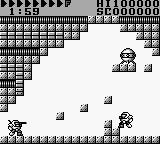
In After Burst, players navigate through levels filled with various challenges, likely involving a mix of platforming and action elements. The gameplay mechanics typically include jumping, running, and attacking enemies, which were common attributes in action titles of the time. Players will need to familiarize themselves with the controls and levels to progress, though the exact nature of objectives and enemy types remains less documented.
This title is worth exploring for fans interested in lesser-known Game Boy games. While it may not have the same recognition as other major titles from the era, it provides insight into the variety of experiences available on the platform. After Burst can be seen as a niche title that reflects the creativity and experimentation of its time, making it a unique addition for collectors and retro gaming enthusiasts alike.
GAME INFO
- Platform
- Game Boy
- Genre
- Action
- Publisher
- Nippon Computer Systems
- Released
- 1990
- Region
- Japan
How to play After Burst online
Getting Started: To start playing After Burst, load the game and familiarize yourself with the menus, which are in Japanese. Navigating through the initial screens usually involves selecting options with the A button to confirm your choices.
Once you start the game, the core loop revolves around progressing through various levels filled with enemies and obstacles. You'll need to jump, run, and attack as you navigate your environment. Pay attention to enemy patterns and learn when to strike or evade, as this will be crucial to advancing through the game.
CONTROLS
Controls
- Arrow Keys — D-Pad / Movement
- X — A button (jump / confirm)
- S — B button (run / attack / cancel)
- Enter — Start / Pause
- V — Select
After Burst FAQ
Who developed After Burst?
Information about the developer is not widely documented, making it difficult to ascertain who specifically created After Burst for the Game Boy.
Is After Burst considered easy to pick up or challenging?
The game likely presents a moderate challenge, typical of many action titles of its time. Players should expect to invest some time learning the controls and enemy patterns to succeed.
Is After Burst exclusive to Game Boy or did it appear on other systems?
After Burst appears to be exclusive to the Game Boy platform, with no known releases on other systems.
You may also like
All Game Boy games











GAME INFO
- Platform
- Game Boy
- Genre
- Action
- Publisher
- Nippon Computer Systems
- Released
- 1990
- Region
- Japan
COMMENTS (0)
No comments yet. Be the first to share your thoughts.