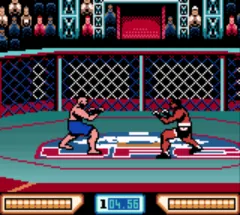
Ultimate Fighting Championship (Europe)
About Ultimate Fighting Championship (Europe)
This is the European release of Ultimate Fighting Championship for the Game Boy Color, an official cartridge that hit shelves around the turn of the millennium. It's a rare attempt to bring the UFC's mixed martial arts action to Nintendo's handheld, and it's notable for being a fully 3D rendered fighting game on a system not exactly known for that kind of visual ambition. The developers managed to squeeze in a custom character creator that lets you build fighters using real-life game media personalities - editors like Greg Sewart and Dan Leahy, and PR folks like Rob Fleisher - which gives it a weirdly meta charm.
How to Play Ultimate Fighting Championship (Europe) Online
Getting Started
When you boot up Ultimate Fighting Championship, you'll be greeted by a title screen that offers several modes: a standard Exhibition match, a Tournament mode where you climb a ladder of opponents, and a Create-A-Fighter feature that lets you tinker with stats and appearance. Pick your fighter from the roster - some are based on real UFC names, others on those media personalities mentioned earlier - or build your own if you want something personal.
The core gameplay revolves around striking and grappling. You control your fighter on a flat 3D plane, and the limited buttons of the Game Boy Color map to punches, kicks, and a grab. Each round is timed, and you win by knockout, submission, or judges' decision. The AI can be tough, so you'll need to learn the range of your attacks and when to close in for a takedown.
One quirk of this cartridge is the custom character name entry - since the European version is in English, menus are straightforward, but the character creator's stat distribution can feel cryptic. Experiment with balancing power, speed, and stamina to find a build that suits your play style. There's no tutorial, so expect to learn by trial and error in Exhibition mode before tackling the tournament.
Ultimate Fighting Championship (Europe) Keyboard Controls
Controls
- Arrow Keys: D-Pad / Movement
- X: A button (jump / confirm)
- S: B button (run / attack / cancel)
- Enter: Start / Pause
- V: Select
Comments (0)