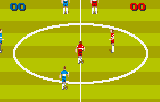
The game loads when you press Play · press “Play Now” inside the game if it asks.
World Class Soccer (USA, Europe)
World Class Soccer
Inside World Class Soccer
- ATARI Lynx
- Sports
- 5· 0 votes
GAME INFO
- Platform
- ATARI Lynx
- Genre
- Sports
- Publisher
- U.S. Gold
- Released
- 1993
- Players
- 1-2
- Region
- USA, Europe
How to play World Class Soccer online
CONTROLS
Controls
- Arrow Keys: D-Pad / Movement
- X: A button
- S: B button
- Q: Option 1
- E: Option 2
- Enter: Pause
World Class Soccer FAQ
Roughly how long does it take to finish World Class Soccer?
A single match lasts around 5-10 minutes. There is no career or tournament mode, so finishing the game means completing one match or repeatedly playing against the AI. It is a pick-up-and-play sports title with no defined finish.
Is World Class Soccer exclusive to ATARI Lynx or did it appear on other systems?
World Class Soccer also saw releases on the Sega Genesis and Super Nintendo Entertainment System in 1993 and 1994, under the title Champions World Class Soccer. The Lynx version is a portable conversion with slightly simpler graphics and controls.
Can players save progress in World Class Soccer?
No, the game does not include any save feature. All progress is lost when the console is turned off. Each match is self-contained, so there is nothing to save.
You may also like
All ATARI Lynx games
GAME INFO
- Platform
- ATARI Lynx
- Genre
- Sports
- Publisher
- U.S. Gold
- Released
- 1993
- Players
- 1-2
- Region
- USA, Europe
COMMENTS (0)
No comments yet. Be the first to share your thoughts.