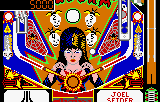
The game loads when you press Play · press “Play Now” inside the game if it asks.
Pinball Jam (USA, Europe)
Pinball Jam
Pinball Jam Overview
- ATARI Lynx
- Arcade
- 5· 0 votes
GAME INFO
- Platform
- ATARI Lynx
- Genre
- Arcade
- Publisher
- Atari Corporation
- Developer
- Atari Corporation
- Released
- 1992
- Players
- 1
- Region
- USA, Europe
How to play Pinball Jam online
Getting Started
When you boot Pinball Jam, you can choose between the two tables: Elvira and the Party Monsters or Police Force. Each table has its own rules, ramps, and scoring objectives. Your first goal is simply to keep the ball in play by using the flipper buttons (S for left? Actually check: On Lynx, left flipper is usually A button, right flipper is B button. But the emulator mapping above says X=A, S=B. So left flipper = X, right flipper = S. Verify: In pinball, typically left flipper is mapped to A button, right to B. So X and S respectively.) Tap these to hit the ball and aim for lit targets, ramps, and multiball modes.
Each table has a specific scoring system. For Elvira, you can activate spooky scenes by hitting certain targets. Police Force has a cop theme where you collect evidence and catch criminals. The core loop is classic pinball: launch the ball, survive as long as possible, and rack up high scores. Watch for the plunger power meter when launching - hold the launch button then release. Nudge the table with the D-pad to influence the ball's trajectory, but be careful not to tilt.
If you are new to pinball, focus on learning the basic shots on each table before chasing high scores. The Lynx screen is small, so take a moment to study the table layout. Use the Select button to change the camera view if the game offers that option - it can help you see the top of the table. Finally, aim for the skill shot on the first plunge to start with bonus points.
CONTROLS
Controls
- Arrow Keys: D-Pad / Movement
- X: A button
- S: B button
- Q: Option 1
- E: Option 2
- Enter: Pause
Pinball Jam FAQ
Who developed Pinball Jam?
Pinball Jam was developed and released by Atari Corporation for the Atari Lynx in 1992.
Which regions was Pinball Jam released in?
The game was released in both the USA and Europe, as indicated by the title.
What makes Pinball Jam stand out among ATARI Lynx titles of its era?
It is one of the few official pinball games on the Lynx, and it recreates two licensed Williams tables with all-new audio, offering a portable pinball experience that stays faithful to the original playfields and rules.
You may also like
All ATARI Lynx games




GAME INFO
- Platform
- ATARI Lynx
- Genre
- Arcade
- Publisher
- Atari Corporation
- Developer
- Atari Corporation
- Released
- 1992
- Players
- 1
- Region
- USA, Europe
COMMENTS (0)
No comments yet. Be the first to share your thoughts.