The game loads when you press Play · press “Play Now” inside the game if it asks.
Fidelity Ultimate Chess Challenge, The (USA, Europe)
Fidelity Ultimate Chess Challenge, The
Inside Fidelity Ultimate Chess Challenge, The
- ATARI Lynx
- Board Game
- 5· 0 votes
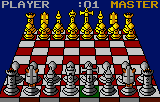
Fidelity Ultimate Chess Challenge, The is a straightforward chess simulation for the Atari Lynx, released in North America and Europe during the early 1990s. It was produced under license from Fidelity Electronics, a company famous for its dedicated electronic chess computers, bringing a familiar brand to the handheld. The game arrived when the Lynx was competing with Nintendo's Game Boy, offering more complex strategy options for portable play.
In the game, you play standard chess either against a computer opponent or a second player using a link cable (if your Lynx and cartridge support it). You navigate the board with the D-pad, select a piece with one button, and confirm the move with another. The computer opponent adjusts its skill based on the difficulty level you pick, which ranges from basic to quite challenging. There is also a move list that scrolls at the bottom of the screen, letting you review the game's history.
Today this title is a solid example of early 90s portable chess, but it is not flashy or deep by modern standards. Its clean interface and adjustable AI make it a decent pick for Lynx collectors who want a no‑frills strategy game. If you already own a chess app on your phone, this will feel primitive, but for its time it offered a competent game of chess on the go. It is a niche entry in the Lynx library, worth a look if you enjoy retro board game adaptations.
GAME INFO
- Platform
- ATARI Lynx
- Genre
- Board Game
- Players
- 1-2
- Region
- USA, Europe
How to play Fidelity Ultimate Chess Challenge, The online
After the game loads, you will see a menu where you choose the game mode (e.g., Computer Opponent or Two‑Player). Use the D‑pad to highlight an option and press X (A) to confirm. The chessboard then appears with the standard starting position. Move the cursor over a piece, press X to select it, then move the cursor to a legal square and press X again to make the move. Press S (B) to cancel a selection if you change your mind.
If you are playing against the computer, wait for it to compute its move (the delay depends on the difficulty setting). The game will display the move on the board and update the move log at the bottom. Play continues until checkmate, stalemate, or one player resigns. There is no save feature on the original cartridge, so you must finish a game in one sitting. Some emulators allow save states, but the original hardware does not support saving progress.
For two‑player matches, you will need a link cable and a second Lynx with the same cartridge. Select the two‑player option and follow the on‑screen prompts to connect. The game will then alternate turns between the two handhelds.
CONTROLS
Controls
- Arrow Keys: D-Pad / Movement
- X: A button
- S: B button
- Q: Option 1
- E: Option 2
- Enter: Pause
Fidelity Ultimate Chess Challenge, The FAQ
Can players save progress in Fidelity Ultimate Chess Challenge, The?
There is no built‑in save feature on the original hardware; a game must be completed in one session. Some emulators offer save states, but the cartridge itself has no battery backup or password system.
Is there anything iconic or memorable about Fidelity Ultimate Chess Challenge, The?
Its most distinctive trait is the Fidelity branding, linking it to a well‑known line of electronic chess computers. The adjustable AI difficulty levels make it accessible to both casual players and more experienced chess enthusiasts.
Is Fidelity Ultimate Chess Challenge, The exclusive to ATARI Lynx or did it appear on other systems?
It was released only for the Atari Lynx. No ports to other consoles or computers were made, so it remains a Lynx‑exclusive title.
You may also like
All ATARI Lynx games

GAME INFO
- Platform
- ATARI Lynx
- Genre
- Board Game
- Players
- 1-2
- Region
- USA, Europe
COMMENTS (0)
No comments yet. Be the first to share your thoughts.