CHOOSE A VERSION
2 versions · same consoleChoose an original release, regional version, revision, bootleg or clearly labelled ROM hack/mod, then press Play. Hacks may change the gameplay. Switching versions restarts the player.
Selected: Default · USA · USA
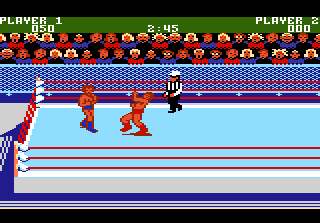
The game loads when you press Play · press “Play Now” inside the game if it asks.
Mat Mania Challenge (USA)
Mat Mania Challenge
About Mat Mania Challenge
- ATARI 7800
- Sports
- 5· 0 votes
GAME INFO
- Platform
- ATARI 7800
- Genre
- Sports
- Players
- 1-2
- Region
- USA
How to play Mat Mania Challenge online
Getting Started
When you boot up Mat Mania Challenge, you will see a title screen followed by a matchup selection. Choose a wrestler - there is a small roster of grapplers, each with slightly different stats for speed and power. The core loop involves timed matches where you pin your opponent or score a knockout. Movement is with the D-pad, and you execute holds and strikes using the A and B buttons.
The match begins with both wrestlers in the ring. Use the D-pad to move toward your opponent, then press the attack button to throw punches or kicks. Grapple by getting close and pressing the run button. The goal is to wear down your opponent's health meter and then perform a pinning move. The referee counts to three. If the health bar is depleted completely, you may also win by knockout.
New players should know that timing is crucial. Throwing wild strikes leaves you open for counterattacks. Learn each wrestler's special moves by experimenting with different button combinations near your opponent. The matches are short, so you will need to be aggressive. If you are playing against a friend, you may need a second joystick. Check the in-game menu for start and select to join.
CONTROLS
Controls
- Arrow Keys: Joystick
- X: Button 1
- S: Button 2
- Enter: Pause
- V: Select
Mat Mania Challenge FAQ
Who developed Mat Mania Challenge?
The original arcade version was developed by Technos Japan, known for their wrestling and beat-em-up titles. The Atari 7800 port was likely handled by Atari's in-house team or a contracted developer, but specific credits are not widely documented.
What makes Mat Mania Challenge stand out among ATARI 7800 titles of its era?
It is one of the few wrestling games on the Atari 7800, offering a direct translation of the arcade-style gameplay with timed matches, realistic(ish) grappling, and a simple but effective control scheme for its time. The sprite animations and crowd noise add to the atmosphere, making it a credible sports title for the console.
Is Mat Mania Challenge considered easy to pick up or challenging?
The game is relatively easy to start playing because the controls are basic: move, punch, grapple, pin. However, mastering the timing for reversals and special moves takes practice, and the AI can be punishing on higher difficulty settings. It offers a fair balance for casual and dedicated players.
You may also like
All ATARI 7800 games
GAME INFO
- Platform
- ATARI 7800
- Genre
- Sports
- Players
- 1-2
- Region
- USA
COMMENTS (0)
No comments yet. Be the first to share your thoughts.