Karateka (Europe)
Karateka (Europe): A7800 Fighting
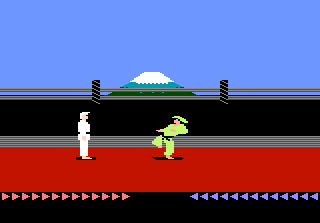
Karateka is a classic martial arts action game that originally appeared on the Apple II in 1984, created by Jordan Mechner while he was at Yale. This European release for the ATARI 7800 is a port of that influential title, which was one of the first fighting games to use rotoscoped animation and cinematic storytelling. It was published in Europe by Ariolasoft.
In the game, you control a karateka on a quest to rescue the princess from an evil warlord. You walk through side-scrolling levels, facing off against guards and other enemies. Combat consists of punches and kicks, and you must time your attacks carefully. The game uses a health bar system, and if you take too much damage, you die. The final confrontation is with the warlord himself, and after defeating him, you must be careful not to harm the princess, as she can accidentally die as well.
For retro gaming enthusiasts, Karateka on the ATARI 7800 is a great way to experience a piece of gaming history. The game's influence on later titles like Prince of Persia (also by Mechner) is evident in its animation and storytelling. While it may seem simple by modern standards, its tight combat and memorable presentation make it worth revisiting. It stands as an important milestone in the evolution of fighting and action games.
How to Play Karateka (Europe) Online
Start the game and you will see the title screen. Press Start to begin. You control the karateka as he walks from left to right through the warlord's fortress.
Enemies appear and you must fight them using punches and kicks. The B button (S key on keyboard) attacks. Press the A button (X key) to jump over obstacles or to avoid attacks. Each enemy has a pattern, so learn their timing.
Your goal is to reach the princess at the end. Be careful: if you accidentally hit her after defeating the warlord, she dies and you lose. The game is single-player only with a linear progression. Use practice to master the combat rhythm.
Karateka (Europe) Keyboard Controls
Controls
- Arrow Keys: Joystick
- X: Button 1
- S: Button 2
- Enter: Pause
- V: Select
Comments (0)