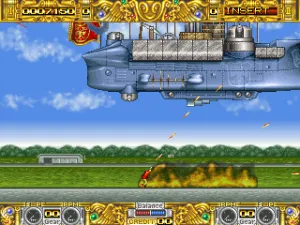
Boogie Wings (USA v1.7, 92.12.14)
Boogie Wings (USA v1.7, 92.12.14) - Shooter Classic
Boogie Wings is a horizontally scrolling shooter released by Data East for arcades in 1992. This version carries the USA v1.7 label, dated December 14, 1992, likely a minor update for the US market. It is a pure arcade title, never ported to home consoles of the era, staying true to the coin-op experience.
Players pilot a biplane through side-scrolling stages, shooting at enemies and avoiding obstacles. The core gameplay involves flying over various landscapes, from cityscapes to deserts, while destroying enemy aircraft and ground targets. Power-ups appear to upgrade your weaponry, and the game throws increasingly dense waves of foes at you. It is a straightforward shooter in the classic Data East tradition, with a focus on fast action and score chasing.
For fans of early 90s arcade shooters, Boogie Wings offers a solid dose of straightforward shooting fun. It does not reinvent the wheel but delivers polished, colorful graphics and responsive controls. Compared to contemporaries like Twin Cobra or 1942, it is a lesser-known title, but that makes it a nice discovery for retro enthusiasts exploring the arcade library. It is a solid entry in the genre, worth a few credits.
How to Play Boogie Wings (USA v1.7, 92.12.14) Online
To start Boogie Wings, insert a coin by pressing V (Select) and then press Enter to begin. The game will show an attract mode; press Start to jump into action. Your biplane moves with the arrow keys and fires with the B button (S key). The A button (X key) may trigger a special attack or bomb, typical of the genre. Focus on dodging enemy fire while collecting power-ups that float down from destroyed enemies. The core loop is simple: fly, shoot, survive, and try to achieve a high score. New players should learn enemy patterns quickly, as later stages become challenging. There is no save or continue feature; it is designed for arcade play, one life at a time.
Boogie Wings (USA v1.7, 92.12.14) Keyboard Controls
Controls
- Arrow Keys: Joystick / Movement
- X: Button 1
- S: Button 2
- Z: Button 3
- A: Button 4
- Q: Button 5
- E: Button 6
- Enter: Start / 1P
- V: Coin / Insert


Comments (0)