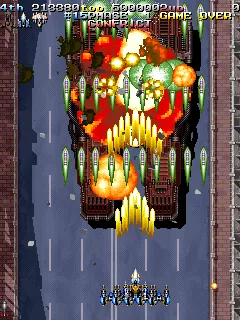
Armed Police Batrider - A Version (Hong Kong) (Mon Dec 22 1997)
Armed Police Batrider - A Version (Hong Kong) (Mon Dec 22 1997) on arcade
This is Armed Police Batrider, a vertical shoot 'em up originally released by Raizing in 1997. The "A Version (Hong Kong)" build dates to December 22, 1997, making it a late revision of the game. It ran on the same arcade hardware as the developer's earlier Battle Garegga.
Players choose from a roster of armed police officers and vehicles, then blast through waves of enemies across multiple stages. The core gameplay involves dodging dense bullet patterns while managing a limited number of bombs. A key mechanic is the "medal" system that builds a multiplier for higher scores.
Batrider is often praised for its refined scoring systems and satisfying bullet hell gameplay. For fans of 1990s arcade shoot 'em ups, it stands as a worthy follow-up to Battle Garegga. The Hong Kong version may include minor balance tweaks, making it interesting for series enthusiasts.
How to Play Armed Police Batrider - A Version (Hong Kong) (Mon Dec 22 1997) Online
First, press Start to enter the game. You'll see a character selection screen with several police officers and vehicles. Use the D-Pad to highlight a character and press X to confirm. Each character has different shot patterns and speed.
Once in the game, you control your chosen character through vertically scrolling stages. Hold the attack button for continuous fire, and release it to deploy your option drones. Use bombs (mapped to one of the shoulder buttons) to clear the screen in emergencies. Collect medals dropped by enemies to increase your score multiplier.
The core loop is straightforward: shoot everything, avoid enemy bullets and collisions, and survive to the stage's boss. Mastering the movement and bomb timing is key to lasting longer. Since the menus are in English for this Hong Kong version, navigation is easy even for newcomers.
Armed Police Batrider - A Version (Hong Kong) (Mon Dec 22 1997) Keyboard Controls
Controls
- Arrow Keys: Joystick / Movement
- X: Button 1
- S: Button 2
- Z: Button 3
- A: Button 4
- Q: Button 5
- E: Button 6
- Enter: Start / 1P
- V: Coin / Insert


Comments (0)