The game loads when you press Play · press “Play Now” inside the game if it asks.
Virtual Pinball (USA, Europe)
Virtual Pinball
About Virtual Pinball
- SEGA Genesis
- Simulation
- 5· 0 votes
GAME INFO
- Platform
- SEGA Genesis
- Genre
- Simulation
- Publisher
- Electronic Arts
- Developer
- Bill Budge
- Released
- 1993
- Region
- USA, Europe
How to play Virtual Pinball online
Getting Started
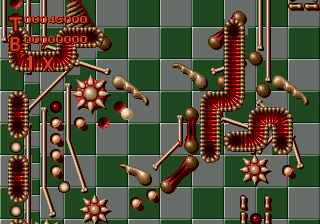
When the game boots, you will see a title screen. Press Start to reach the main menu, where you can choose between playing a preloaded table or entering the level editor. Each table has its own rules and scoring objectives, so take a moment to scan the on-screen instructions if any appear.
During play, use the D‑Pad for nudging the table (a quick left or right tap can save the ball from draining down the center). Use the A and B buttons for the left and right flippers - exactly which button maps to which flipper depends on your controller setup, but the default EmulatorJS mappings work fine. Launch the ball by pressing a button when the launcher power meter is at a desired strength.
If you want to design your own table, enter the level editor from the menu. Here you can place bumpers, ramps, and targets on a grid, then save your creation to play later. The editor is grid‑based and fairly intuitive once you experiment with the simple interface. Focus on high scores and table completion to get the most out of Virtual Pinball.
CONTROLS
Controls
- Arrow Keys: D-Pad / Movement
- X: A button
- S: B button
- Z: C button
- A: X button (6-button pad)
- Q: Y button (6-button pad)
- E: Z button (6-button pad)
- Enter: Start / Mode
Virtual Pinball FAQ
Roughly how long does it take to finish Virtual Pinball?
Virtual Pinball has no set ending because pinball games are score‑driven. How many hours you put in depends on how often you play each table and whether you spend time building custom levels. Many players find dozens of hours of entertainment across the included tables and editor.
Is Virtual Pinball an official release, a fan hack, a prototype, or another kind of build?
It is an official commercial release for the SEGA Genesis, sold in stores in North America and Europe. It is not a hack, prototype, or homebrew project.
Is Virtual Pinball exclusive to SEGA Genesis or did it appear on other systems?
Virtual Pinball was released only for the SEGA Genesis. It did not appear on other consoles or computers during its original run.
You may also like
All SEGA Genesis games











GAME INFO
- Platform
- SEGA Genesis
- Genre
- Simulation
- Publisher
- Electronic Arts
- Developer
- Bill Budge
- Released
- 1993
- Region
- USA, Europe
COMMENTS (0)
No comments yet. Be the first to share your thoughts.