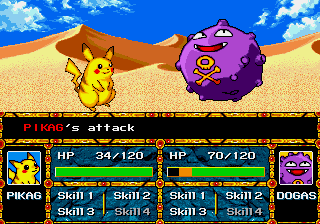
The game loads when you press Play · press “Play Now” inside the game if it asks.
Pokemon Stadium
Pokemon Stadium
Inside Pokemon Stadium
- SEGA Genesis
- Strategy
- Fan Game
- 5· 0 votes
Unofficial fan game. The notes below come from community sources and have not been verified against the patch itself, so levels, mechanics and features may differ from what is described.
GAME INFO
- Platform
- SEGA Genesis
- Genre
- Strategy
- Based on
- Pokemon Stadium
How to play Pokemon Stadium online
CONTROLS
Controls
- Arrow Keys: D-Pad / Movement
- X: A button
- S: B button
- Z: C button
- A: X button (6-button pad)
- Q: Y button (6-button pad)
- E: Z button (6-button pad)
- Enter: Start / Mode
Pokemon Stadium FAQ
Is Pokemon Stadium exclusive to SEGA Genesis or did it appear on other systems?
The official Pokemon Stadium was released exclusively for the Nintendo 64. This Genesis version is a fan-made demake that does not exist on any other platform. It is a homebrew creation that seeks to replicate the N64 game's battle system on Sega's 16-bit console.
Does Pokemon Stadium have a multiplayer or co-op mode?
The original N64 game supported multiplayer battles, but this Genesis fan port is not widely documented regarding multiplayer. Based on typical homebrew limitations, it is likely single-player only, pitting you against an AI opponent. No co-op mode has been confirmed for this version.
Roughly how long does it take to finish Pokemon Stadium?
Completion time is not established for this fan game because it may be incomplete or have no set ending. If it follows the structure of the original, a full run through all cup battles could take 5-10 hours, but the demake's content is likely truncated. Expect a shorter experience if only a limited set of battles is implemented.
You may also like
All SEGA Genesis games











GAME INFO
- Platform
- SEGA Genesis
- Genre
- Strategy
- Based on
- Pokemon Stadium
COMMENTS (0)
No comments yet. Be the first to share your thoughts.