The game loads when you press Play · press “Play Now” inside the game if it asks.
MLBPA Baseball (USA)
MLBPA Baseball
Inside MLBPA Baseball
- SEGA Genesis
- Sports
- 5· 0 votes
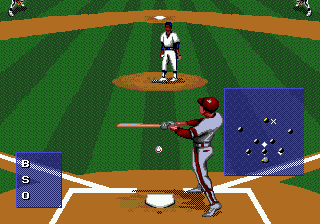
You pick your teams, then play a full nine-inning game of baseball. The big selling point here is the oversized player sprites - they're noticeably larger than in most Genesis baseball games, which makes batting and fielding feel more personal and less like moving tiny dots around. The core loop is standard: pitch, hit, run bases, field, and try to outscore the opponent. There's a full season mode that tracks standings and stats, plus scoreboard animations between innings that add a bit of local TV broadcast flair. It's baseball, plain and simple, with no weird power-ups or hidden mechanics.
What makes it worth a look today is that combination of big sprites and the season mode, which was still a relatively new feature for console baseball in '95. It doesn't reinvent the wheel, but it's a solid, playable baseball game that feels distinct from the more famous Ken Griffey Jr. or Triple Play series. If you want a quick exhibition game or a full season with a friend, MLBPA Baseball delivers that without any gimmicks. It's a niche pick, but a satisfying one if you appreciate that mid-90s Genesis sports library.
GAME INFO
- Platform
- SEGA Genesis
- Genre
- Sports
- Publisher
- EA Sports
- Released
- 1995
- Players
- 1-2
- Region
- USA
How to play MLBPA Baseball online
Getting Started
When you load up MLBPA Baseball, you'll see a title screen and then a menu where you can choose between Exhibition, Season, or maybe a home run derby mode - this game doesn't overcomplicate it. Pick Exhibition for a quick single game or Season for a full schedule. You'll be asked to select your home and away teams from a list of MLBPA-licensed player rosters; the game uses player names but no official team names or logos, just city-based labels.
The core gameplay is standard baseball: you control the pitcher first, aim your pitch with the D-Pad, then press X to throw. Once the ball is hit, you control the fielder nearest the ball - use the D-Pad to run and press S to throw to a base. When batting, move the cursor over the plate with the D-Pad and press X to swing. Time your swing to the pitch location. The large sprites make judging the ball's path a bit easier than in some other Genesis baseball games.
New players should pay attention to the pitch selection - you can change pitch types using Select (V key). The game gives you a few options like fastball, curve, slider. Experiment with speeds and locations to keep the batter guessing. On defense, you can also cycle through fielders with S to catch pop flies or throw to different bases. It's straightforward once you get the rhythm down. The season mode tracks wins/losses and stats, so you can come back to it over time.
CONTROLS
Controls
- Arrow Keys: D-Pad / Movement
- X: A button
- S: B button
- Z: C button
- A: X button (6-button pad)
- Q: Y button (6-button pad)
- E: Z button (6-button pad)
- Enter: Start / Mode
MLBPA Baseball FAQ
Who developed MLBPA Baseball?
The original developer is not widely documented in available sources. Some references point to Leland Interactive Media, but definitive confirmation is scarce.
Is MLBPA Baseball exclusive to SEGA Genesis or did it appear on other systems?
No, it was released on the Super Nintendo Entertainment System (SNES) as well in 1995. Both versions share similar large sprites and season mode features.
Does MLBPA Baseball have a multiplayer or co-op mode?
Two players can compete directly in head-to-head exhibition games or play cooperatively on the same team in a full season match. It supports standard local multiplayer for two human players.
You may also like
All SEGA Genesis games











GAME INFO
- Platform
- SEGA Genesis
- Genre
- Sports
- Publisher
- EA Sports
- Released
- 1995
- Players
- 1-2
- Region
- USA
COMMENTS (0)
No comments yet. Be the first to share your thoughts.